
Chapter 21: Master Settings Hub (Brand, Appearance, Currency & Security)
Welcome to the MartX Merchant Cockpit. After completing the initial 5-step installer, your first destination is the System Settings Suite (accessible via Admin Sidebar → System Settings). Configure your store branding, logos, currency format, SMTP email delivery, Gemini AI assistant, security shields, and license bindings in under 5 minutes without writing a single line of code.
Visual Flowchart: Settings Propagation & Real-Time Storefront Sync
How configuration changes in the MartX Admin Cockpit instantly propagate across the database, cache, and public storefront:
Admin Input
Update branding, SMTP, AI keys, or currency
Validation & XSS
Strict sanitization & credential format check
DB & Cache Store
Atomic DB save & instant cache invalidation
Runtime Hydration
Overrides Laravel configs on-the-fly (Mail/SEO)
Multi-Channel Sync
Instant reflection across storefront, emails & PDF
21.1 General Settings & Quad-Logo Brand Identity
Navigate to: Admin Sidebar → System Settings → "General Settings" (Tab). This panel manages your core brand metadata, regional timezones, contact information, dynamic copyright footer, and all 4 official storefront logos via the MartX Reusable Media Library.
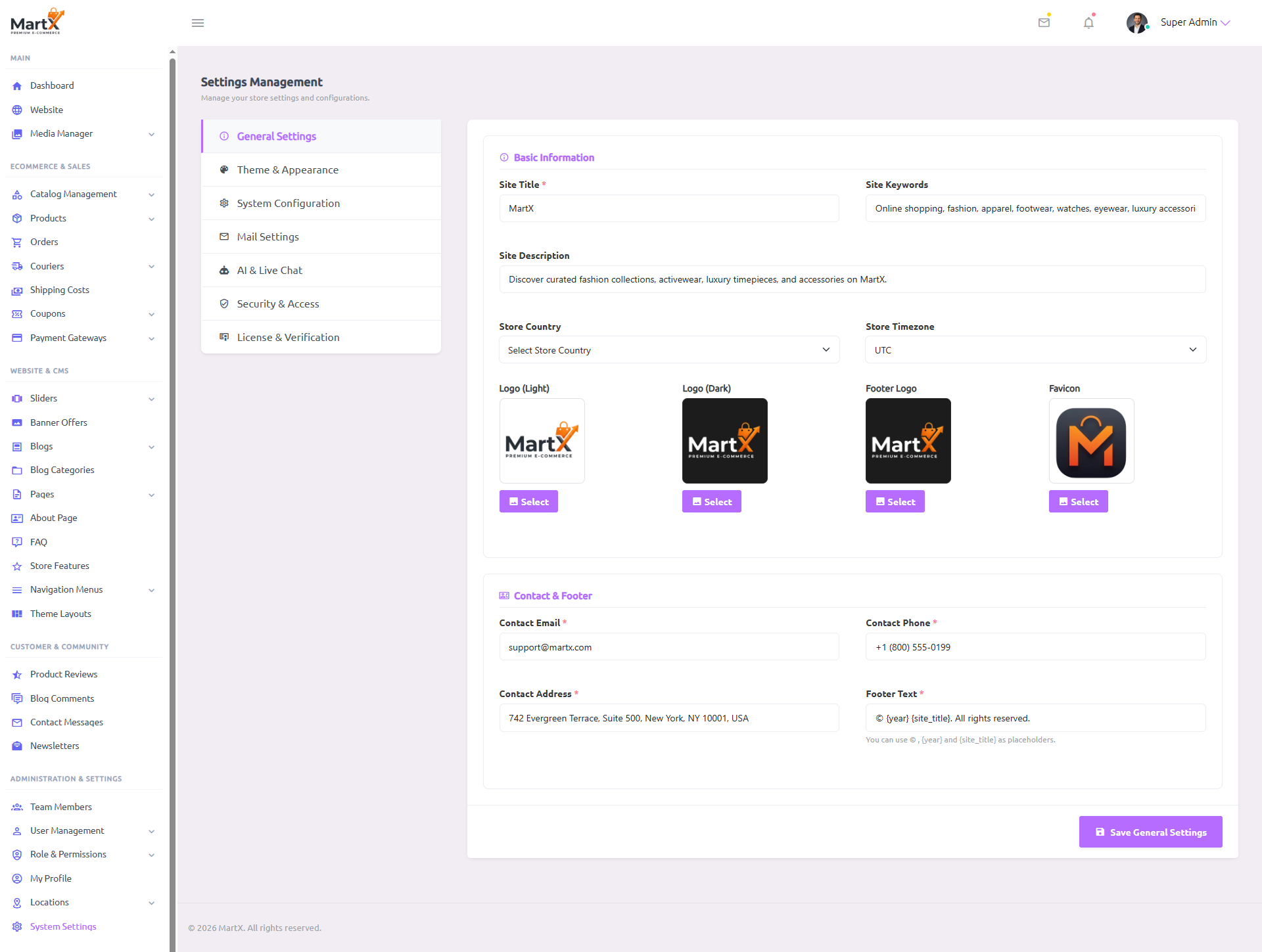
Field-by-Field Breakdown & Storefront Impact
| Field Name & Type | What to Enter & Example | Storefront Impact & Capability |
|---|---|---|
| Site Title Required Text (String) |
Your official brand name. e.g., MartX Megastore |
Global Header & SEO Appears in the browser tab title, search engine rich snippets, automated customer order emails, and replaces the {site_title} footer tag. |
| Site Keywords Optional Comma-separated |
Target SEO search terms. e.g., ecommerce, fashion, electronics, gadgets |
HTML Meta Header Injected automatically into the <meta name="keywords"> HTML header tag for search indexing. |
| Site Description Optional Textarea (3 Rows) |
Concise 1-2 sentence brand summary (120-160 characters recommended). | Social Shares & SERP Generates the <meta name="description"> and OpenGraph social card description when customers share links on Facebook/WhatsApp. |
| Store Country Optional Country Selector |
Select your primary country of business from the ISO global country list. | Checkout Country Default Pre-selects the customer's billing and shipping country on the storefront checkout form for streamlined conversions. |
| Store Timezone Optional Timezone Selector |
Select your standard local timezone. e.g., America/New_York or Asia/Dhaka |
Flash Sales & Invoices Synchronizes flash deal countdown clocks, promotional coupon start/end timestamps, order invoice generation, and refund timestamps. |
| Site Logo (Light) Media Thumbnail PNG / SVG / WebP |
Transparent logo optimized for bright/white backgrounds (recommended height: 40-55px). | Light Mode Header Renders in the main navigation bar whenever the storefront is in Light Mode. |
| Site Logo (Dark) Media Thumbnail PNG / SVG / WebP |
Inverted white/vibrant logo optimized for dark or slate backgrounds. | Dark Mode Header Automatically switches when a shopper clicks the Dark Theme toggle, ensuring your brand stays vibrant and legible. |
| Footer Logo Media Thumbnail PNG / SVG / WebP |
Secondary brand badge or stacked logo. | Storefront Footer Renders above your store's bio paragraph in the footer across all public pages. |
| Favicon Media Thumbnail ICO / PNG (1:1 Ratio) |
Square brand icon (recommended: 32x32px or 64x64px). | Browser Tabs & Bookmarks Displayed in browser tabs, mobile PWA shortcuts, and customer bookmark bars. |
| Contact Email Required Valid Email Address |
Official merchant support email. e.g., [email protected] |
Contact Us & Topbar Displayed on the Contact Us page, customer service widgets, and receives incoming contact form submissions. |
| Footer Text Required Dynamic Template String |
Use smart dynamic placeholders:© {year} {site_title}. All Rights Reserved. |
Bottom Copyright Bar Automatically keeps the copyright year current (e.g. 2026+) without manual annual updates. |
Dynamic XML Sitemap & Robots.txt Security Architecture
MartX includes an enterprise-grade, zero-configuration dynamic SEO engine. You do not need to install third-party plugins or manually generate XML files.
Submit this primary URL to Google Search Console and Bing Webmaster Tools:
- Includes all active Products, Categories, Subcategories, Brands, CMS Pages, and Blogs.
- Instant Observer Invalidation: Cache refreshes automatically whenever you add or edit products/blogs.
Live crawler steering file accessible directly at:
- Blocks search bots from crawling private customer carts, checkout sessions, and user profiles.
- Adaptive Admin Shield: Automatically syncs with your custom Admin URL Prefix to hide admin login routes from Google indexing.
21.2 Theme & Appearance Hub (Typography, 9 Luxury Color Skins & Social Links)
Navigate to: Admin Sidebar → System Settings → "Theme & Appearance" (Tab). MartX eliminates custom CSS coding by providing 7 Curated Google Typography Presets, 9 One-Click Luxury Color Skins (plus a Full Custom Hex Mode), a customer Dark/Light Mode Switcher, an AOS Scroll Animation Guard, and 3 precision hex color pickers.
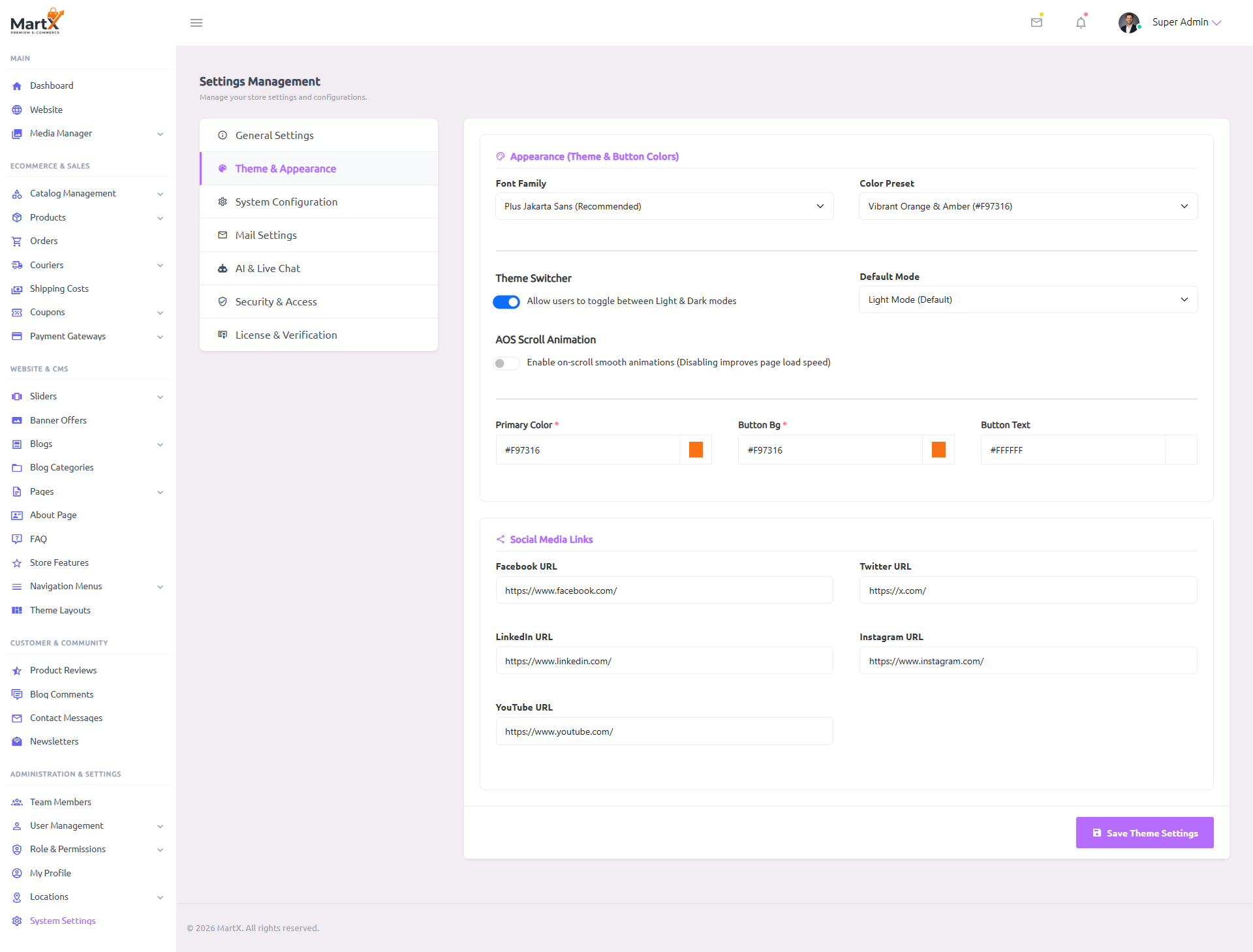
| Field Name & Type | What to Enter & Options | Storefront Impact & Capability |
|---|---|---|
Font FamilyDropdown Selector |
Choose from 7 curated Google Font engines: • Plus Jakarta Sans (Recommended - Modern SaaS & Tech)• Inter (Modern Tech & Readability)• Outfit (High-End Fashion)• Poppins (Classic E-Commerce)• Playfair Display (Editorial Luxury Serif)• Urbanist (Modern Streetwear & Gen-Z)• DM Sans (Clean & Fast Minimalism)
|
Global Typography Applies dynamically to all storefront headings, body text, buttons, product pricing badges, and navigation menus with zero CSS compilation. |
Color Preset1-Click Skin |
Choose from 9 handcrafted luxury palettes + Custom Hex Mode: • Vibrant Orange & Amber ( #F97316)• Electric Blue & Slate ( #2563EB)• Luxury Emerald Green ( #059669)• Luxury Noir / Modern Black ( #111827)• Royal Indigo & Violet ( #6366F1)• Crimson Ruby & Rose ( #E11D48)• Champagne Gold & Luxury ( #C5A880)• Nordic Ocean Teal ( #0D9488)• Rose / Warm Luxury ( #D19C97)• Custom Hex Colors (Unlimited freedom via pickers below) |
1-Click Store Palette Instantly applies harmonious primary, button background, and button text colors across all cards, navigation bars, and CTA buttons. |
Theme SwitcherToggle Switch (0 / 1) |
Turn the client-side theme toggle ON or OFF. | Light/Dark Switcher When enabled, displays the sun/moon icon toggle in the storefront header for shoppers. When disabled, locks the site to your chosen default mode. |
Default ModeSelect (Light / Dark) |
Choose what first-time visitors see on initial page load. | First-Time Impression Sets the initial root HTML attribute data-bs-theme="light" or data-bs-theme="dark" before any user preferences are saved to localStorage. |
AOS Scroll AnimationToggle Switch (0 / 1) |
Enable on-scroll smooth entrance animations. Disabling improves page load speed and reduces CPU overhead on mobile devices. |
Performance Optimization Controls whether Animate-On-Scroll (AOS) scripts execute when shoppers browse product grids, promotional banners, and category tiles. |
Hex Color Pickers3 Color Inputs (#HEX) |
Custom 6-digit hex color pickers: • Primary Color: Brand color for badges, links & icons • Button Bg: Main call-to-action button background • Button Text: Button font color (light/dark) |
Micro-Branding Injects real-time CSS variables across all buttons, badges, category pill hovers, and cart badges. Active when Color Preset is set to Custom Hex. |
Social Media Links5 URL Inputs |
Enter full profile links for Facebook, Twitter / X, LinkedIn, Instagram, and YouTube. | Header & Footer Links Renders official branded icons in both the top sticky banner and the main footer. Empty fields are hidden automatically. |
21.3 System Configuration, Global Currency Engine & Storage Symlink
Navigate to: Admin Sidebar → System Settings → "System Configuration" (Tab). Controls regional price formatting, decimal precision, symbol positioning, third-party conversion tracking (Facebook Pixel & Google Analytics), Google Map iframe embedding, and standalone Server Utilities (Storage Symlink & 1-Click Clear Cache).
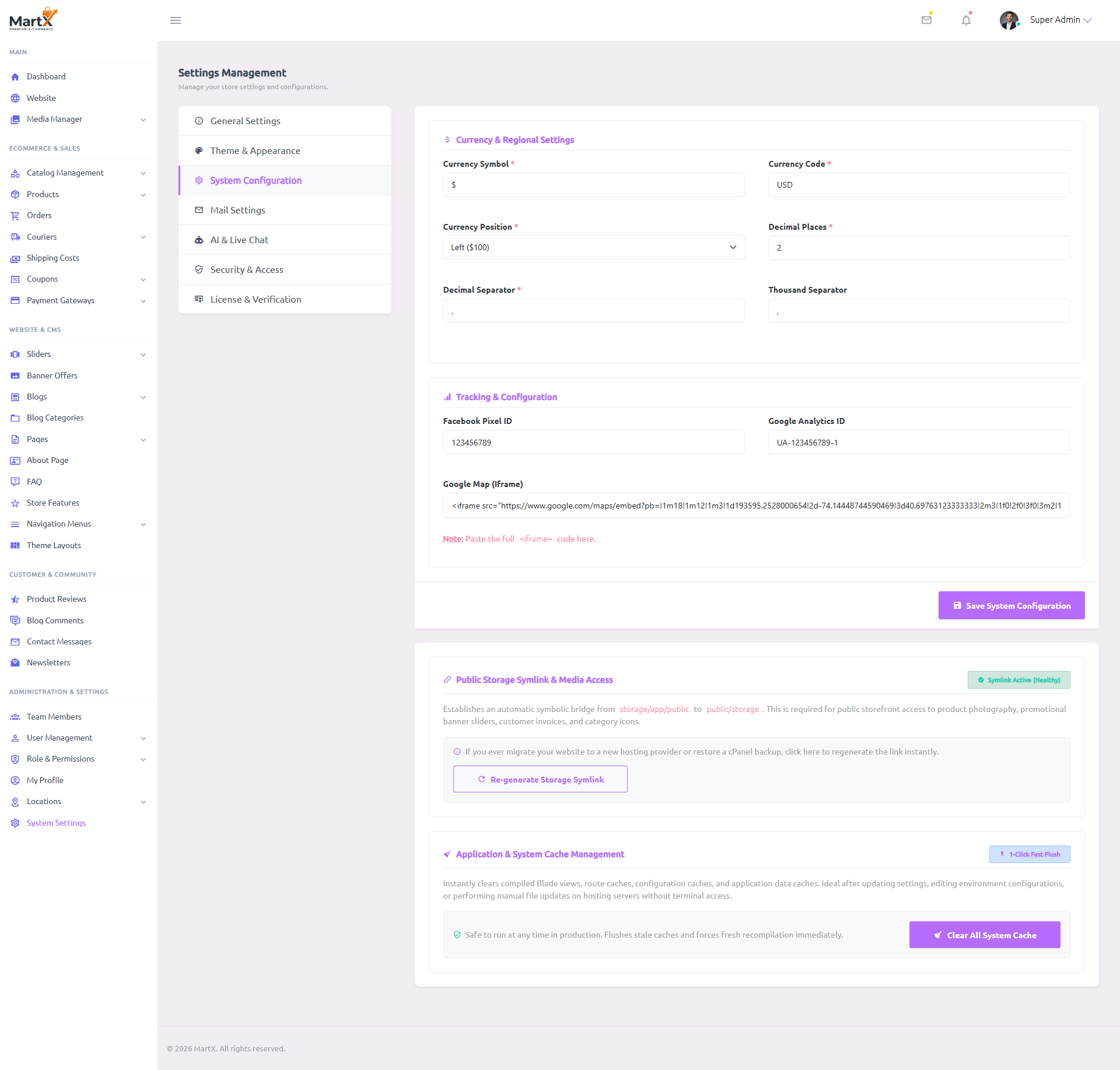
| Field Name & Type | What to Enter & Example | Storefront Impact & Capability |
|---|---|---|
| Currency Symbol Required Text (String) |
The official visual currency character. e.g., $, €, £, ¥, ₹, KD |
Storewide Price Badges Prefixes or suffixes every product card, cart line item, order checkout invoice, and coupon deduction amount. |
| Currency Code Required 3-Letter ISO |
Standard 3-letter banking currency code. e.g., USD, EUR, GBP, AUD |
Payment Gateway Handshakes Passed directly to payment processors (Stripe, PayPal, SSLCommerz, CoinGate) to guarantee correct transaction charges. |
| Currency Position Required Dropdown (Left / Right) |
Select Left or Right.Left: $ 100 | Right: 100 € |
Regional Notation Adapts pricing notation to match local banking customs (e.g. US/UK prefix vs European suffix). |
| Decimal Places Required Number (0 - 4) |
Decimal point precision. • 2 for USD, EUR, GBP (e.g. $ 99.50)• 0 for JPY, KRW (e.g. ¥ 1250) |
Micro-Pricing & Cart Totals Ensures zero unnecessary zeroes for zero-decimal currencies while preserving exact cent precision for global currencies. |
| Decimal / Thousand Separators Required Characters |
• US Style: Decimal . & Thousand , ($ 1,250.00)• EU Style: Decimal , & Thousand . (1.250,00 €) |
Number Formatting Engine Controls number parsing in cart subtotals, shipping calculations, coupon discounts, and PDF invoice downloads. |
Facebook Pixel IDNumeric String |
Meta Business Pixel ID. e.g., 987654321012345 |
Conversion Ad Tracking Automatically fires standard Meta eCommerce tracking events: PageView, ViewContent, AddToCart, and Purchase. |
Google Analytics 4 IDMeasurement ID |
Google Analytics 4 ID starting with G-.e.g., G-ABC123XYZ0 |
Visitor Flow Analytics Injects asynchronous gtag.js scripts into the header for real-time traffic, session durations, and checkout drop-off analysis. |
Google Map (Iframe)HTML Embed Code |
Full embed code copied from Google Maps. Paste entire <iframe src="..."></iframe> |
Contact Us Page Renders a responsive interactive satellite/street map on your public Contact Us page so customers can navigate to your retail store. |
Public Storage SymlinkDynamic Status Badge |
Automatic inspection of symbolic link integrity: • Symlink Active (Healthy) • Symlink Missing |
Media Access Health Bridges storage/app/public to public/storage. Guarantees public storefront visibility for product pictures, category icons, and invoice PDFs. |
Re-generate Storage Symlink1-Click Server Action |
Stand-alone maintenance button. Executes safe symlink re-creation without SSH terminal or command-line access. |
Instant cPanel Recovery Instantly restores broken media links when migrating hosts, changing domain names, or restoring from cPanel zip backups. |
Clear All System Cache1-Click Server Action |
Instant application cache purge button. Executes optimize:clear and flushes runtime key-value cache safely in production. |
Cache Reset & Optimization Instantly clears compiled Blade views, route caches, configuration caches, and application caches. Essential after manual file uploads or environment modifications on shared hosting without SSH terminal access. |
21.4 SMTP Mail Server Setup & Port Matching Blueprints
Navigate to: Admin Sidebar → System Settings → "Mail Settings" (Tab). Reliable email delivery is vital for customer order receipts, 2FA login verification codes, and password resets. MartX provides built-in blueprints for cPanel Webmail, Personal Gmail, and Transactional Relay Gateways (Brevo, Resend, Mailgun).
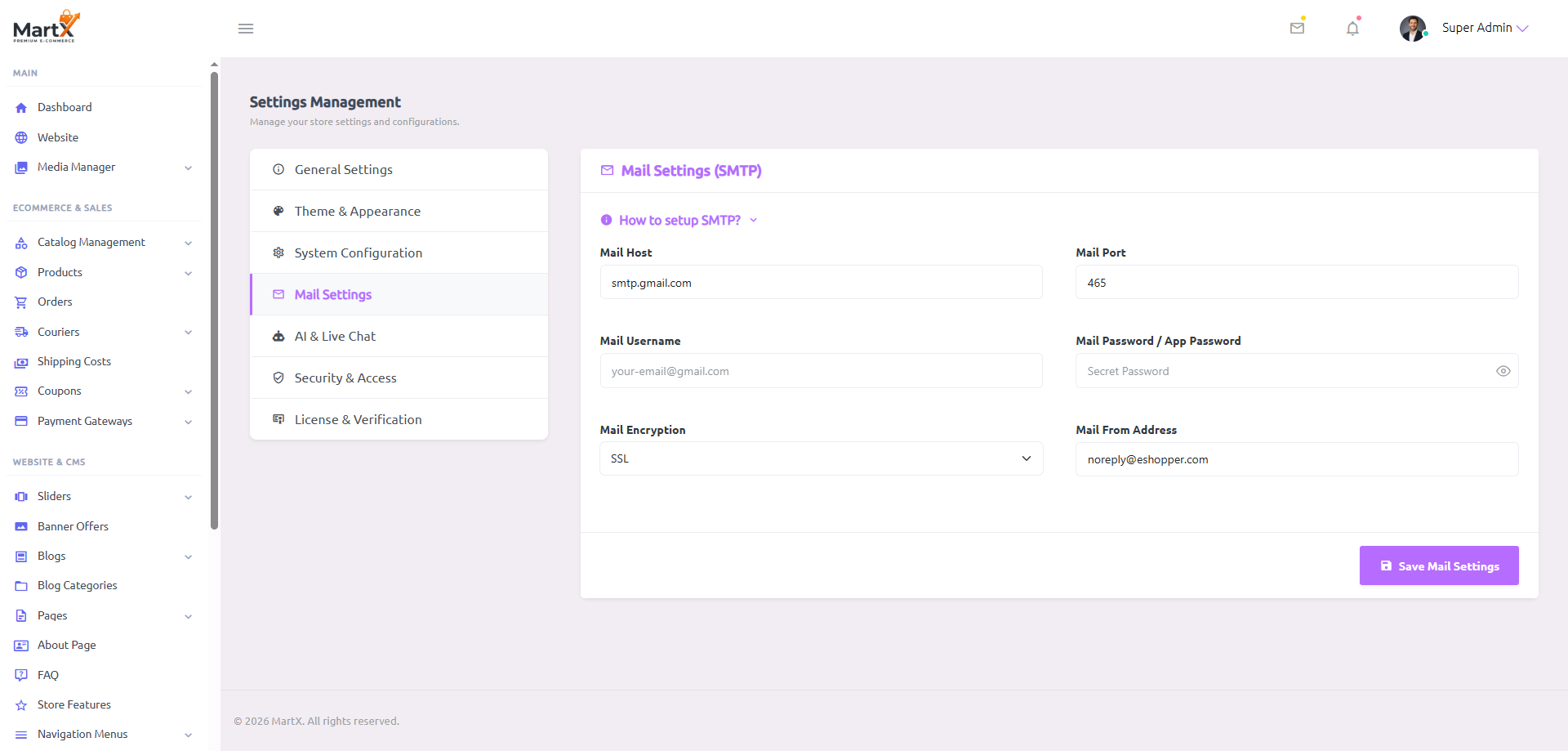
mail.yourdomain.com | Port: 465 | Encryption: SSLsmtp.gmail.com | Port: 465 | Encryption: SSL (Requires 16-digit Google App Password)smtp-relay.brevo.com | Port: 587 | Encryption: TLS| Field Name & Type | What to Enter & Configuration Rules | Storefront Impact & Capability |
|---|---|---|
Mail HostHostname / IP |
Your outgoing mail server. e.g., smtp.gmail.com or mail.yourdomain.com |
SMTP Handshake Establishes the secure socket connection for outgoing transactional emails. |
Mail Port & EncryptionPort Number + Protocol |
Crucial Port Matching Rule: • Port 465 → Must select SSL• Port 587 → Must select TLS |
SSL/TLS Transport Prevents timeout connection errors by pairing the correct cryptographic encryption layer with the corresponding firewall port. |
Mail UsernameUsername / Email |
Your full email address or account username. | SMTP Auth Authenticates your store's sending credentials against the mail server. |
Mail PasswordSecret Password |
For Gmail: Generate a 16-character App Password from your Google Security account (regular password will fail due to 2FA). For Webmail: Enter your mailbox password. |
Secure Relay Stored securely and masked in the database. Never exposed publicly on the storefront. |
Mail From AddressSender Email |
The sender email address shoppers see. e.g., [email protected] |
Inbox Sender Reputation Matches your domain's SPF/DKIM DNS records to prevent emails from ending up in customer spam folders. |
Live SMTP Handshake & Delivery Test Workstation
In standard eCommerce platforms, misconfigured SMTP credentials often go unnoticed until customers complain about missing order receipts or password resets. MartX solves this with an automated socket handshake and real-time delivery verification engine embedded directly into the mail settings interface.
Fill in Host, Port, Encryption, User & Password, then click Save Mail Settings.
Click Use My Admin Email to instantly populate your verified login inbox.
Click Send Test & Verify. The engine executes a live socket test with your mail host.
Upon success, status switches to Verified & Active and the top dashboard warning banner disappears.
21.5 Google Gemini AI Shopping Assistant & WhatsApp Live Hub
Navigate to: Admin Sidebar → System Settings → "AI & Live Chat" (Tab). Enables an autonomous 24/7 AI shopping assistant powered by Google Gemini AI (resilient 4-model fallback cascade: gemini-3.5-flash-lite → gemini-3.6-flash → gemini-2.5-flash → gemini-3.7-flash) (free tier with zero credit card required) and a 1-click WhatsApp Live Agent Support widget.

| Field Name & Type | What to Enter & How to Obtain | Storefront Impact & Capability |
|---|---|---|
Enable AI ChatToggle Switch (0 / 1) |
Turn the Google Gemini floating chat widget ON or OFF. | Floating Storefront Bot When enabled, renders a sleek floating AI chat bubble in the bottom right corner across all storefront pages. |
Gemini API KeyAPI Key String |
Visit Google AI Studio, sign in with your Google account, and click Create API Key. 100% Free Tier: 15 Requests/Min with zero billing setup. |
Autonomous AI Brain Empowers the bot to analyze your live product catalog, suggest accessories, and answer customer sizing or shipping queries in real-time. Stored encrypted with AES-256 in your database. |
AI Assistant Bot NameText (String) |
Custom name for your bot. e.g., MartX AI Advisor |
Chat Header Title Displayed on the chat popup window header, welcome bubble, and avatar card. |
WhatsApp NumberPhone Number |
Official business WhatsApp number including country code. e.g., +18005550199 or +8801700000000 |
1-Click WhatsApp Float When provided, adds an instant WhatsApp floating trigger. Leaving this blank automatically hides the WhatsApp button. |
Pre-filled MessageText (String) |
Default inquiry greeting text. e.g., Hello MartX Team! I need help with an order. |
Instant Chat Pre-fill Pre-fills automatically inside the customer's mobile or desktop WhatsApp client when clicked, eliminating typing friction. |
21.6 Security & Access Shield (URL Obfuscation, 2FA & Rate Limiting)
Navigate to: Admin Sidebar → System Settings → "Security & Access" (Tab) (Super Admin Exclusive). Provides multi-layered defense including custom admin URL prefix obfuscation, 2FA email verification with SMTP pre-flight handshake, single-use emergency backup recovery codes, and brute-force account lockout protection.
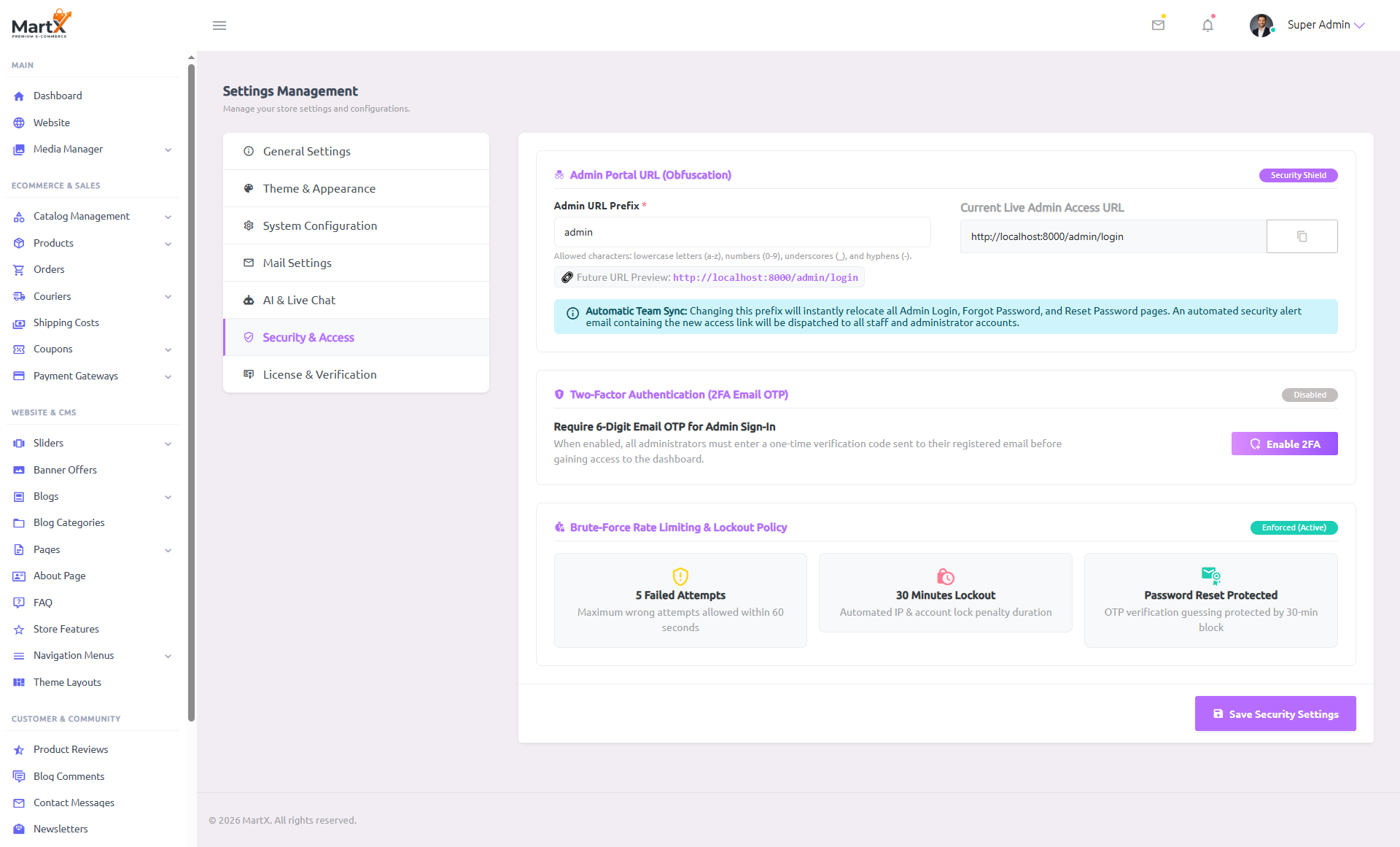
| Feature Name & Type | How it Operates & Rules | Storefront Impact & Capability |
|---|---|---|
Admin URL PrefixSlug String |
Change the default /admin path to any custom slug (e.g. control_hub, secure_portal).Only lowercase a-z, numbers 0-9, hyphens, and underscores allowed. |
Complete URL Obfuscation Instantly updates your secret Admin Login, Password Reset, and Dashboard URLs. Attackers scanning /admin or /wp-admin receive HTTP 404 Not Found. Automatically dispatches the new login link to all staff emails. |
Two-Factor Auth (2FA)Email OTP System |
Requires a 6-digit one-time PIN sent to the administrator's email upon signing in. Built with a live pre-flight SMTP handshake to guarantee email delivery before enforcing. |
Zero Compromise Protection Prevents unauthorized dashboard access even if an administrator's primary password is leaked or compromised. |
5 Emergency Recovery CodesCryptographic Tokens |
Generated during 2FA activation. Includes Copy All and Download .txt buttons. |
Fail-Safe Emergency Login Single-use recovery codes allowing administrators to regain dashboard access if their email provider is temporarily offline. |
| Brute-Force Rate Limiting Automated Protection |
Strict threshold: 5 failed login attempts within 60 seconds triggers an automated 30-minute IP lockout. | Automated DDoS Defense Eliminates automated password-spraying dictionary bots with zero performance penalty on legitimate shoppers. |
21.7 In-Dashboard License Suite & Key Re-binding to New Domain
Navigate to: Admin Sidebar → System Settings → "License & Verification" (Tab) (Super Admin Exclusive). Allows you to review your verified purchase credentials, switch license keys, deactivate a license, or execute an automated 1-Click License Key Re-binding & Migration to a new domain via official email authorization.

| Action / Field | What to Enter & Rules | Storefront Impact & Capability |
|---|---|---|
Active License OverviewRead-Only Card |
Displays your verified license key with masked middle digits (XXXX-****-****-XXXX), registered purchase channel, and bound domain. |
Authentic Verification Confirms your store is backed by official author support, verified software updates during your valid license period, and active domain lock protection. |
Switch / Update LicenseAction Form |
Enter a new license key, purchase email address, and select your purchase channel (Direct / B2B, Codester, TemplateMonster). | Instant Re-binding Allows you to upgrade your license tier (e.g. Regular to Extended Commercial License) or switch keys without touching database tables or reinstalling. |
Deactivate LicenseDanger Action |
Unlinks the license from your current installation. Triggers SweetAlert2 warning regarding initial 7-day trial expiration. |
License Release Frees your license key for deployment on another production server. Note: If your initial 7-day grace period has already passed, the admin panel locks until a new key is activated. |
License Key Re-binding / MigrationAutomated Workflow |
Enter your Target New Domain and click Send 1-Click Confirmation Link. Zero terminal commands or database edits required. |
Seamless Key Relocation Dispatches an authorization link to the buyer's registered purchase email. Clicking "Confirm Domain Transfer" instantly unlinks the key from your old domain and binds it to your new live store with zero downtime. (Details in Chapter 4). |
21.8 Customer Social Authentication Hub (Google & Facebook OAuth 2.0)
MartX provides single-click customer social authentication powered by Laravel Socialite. Shoppers can register and log in instantly using their official Google or Facebook (Meta) accounts across the storefront Login page, Registration page, and interactive Quick Login Modal.
Smart Dynamic UI Visibility & Bank-Grade Safety Guarantee
Enterprise Standard- Optional Configuration (Zero Broken Buttons): If you do not configure Google or Facebook credentials, the social login buttons and the
ORdivider automatically hide. No customer will ever see broken or unconfigured buttons. - Automatic Single-Button Grid: If you configure only Google or only Facebook, the configured button smartly expands to full width (
col-12). If both are configured, they automatically render in a 2-column grid (col-sm-6). - Backend Failsafe Guard: Direct manual visits to
/login/googleor/login/facebookwithout configured credentials are intercepted gracefully and redirected to the login page with a friendly notification—eliminating 400 Bad Request or 500 runtime crashes. - Admin Account Protection: Administrative staff accounts (Super Admin, Admin, Manager) are strictly prohibited from accessing the system via social OAuth, preventing account hijacking vectors.
Google OAuth 2.0 Setup (3 Steps)
- Visit Google Cloud Console, sign in, and create or select a project.
- Navigate to APIs & Services → Credentials → Create Credentials → OAuth Client ID. Select Web application as Application Type.
-
Under Authorized redirect URIs, paste your store's exact callback URL:
https://yourdomain.com/login/google/callback
- Click Create and copy your Client ID and Client Secret.
Facebook (Meta) Login Setup (3 Steps)
- Visit Meta for Developers, log in, and click My Apps → Create App.
- Select Authenticate and request data with Facebook Login.
-
Navigate to Facebook Login → Settings and under Valid OAuth Redirect URIs, paste:
https://yourdomain.com/login/facebook/callback
- Go to App settings → Basic, copy your App ID & App Secret, and switch the App status from Development to Live.
Environment Keys Reference (.env)
| Environment Variable | Description & Where to Find | Sample Value |
|---|---|---|
GOOGLE_CLIENT_ID |
Your official Google Cloud OAuth 2.0 Web Application Client ID. | 982173491-xxxx.apps.googleusercontent.com |
GOOGLE_CLIENT_SECRET |
Confidential client secret string issued by Google Cloud Console. | GOCSPX-xxxxxxxxxxxxxxxx |
GOOGLE_REDIRECT_URI |
Automated OAuth callback URL. Dynamically uses ${APP_URL}. |
${APP_URL}/login/google/callback |
FACEBOOK_CLIENT_ID |
Your Meta for Developers App ID (Numeric string). | 184920491829048 |
FACEBOOK_CLIENT_SECRET |
Confidential application secret key generated in Meta App Settings. | a8f7c9e01b34d78e234f9a0c12 |
FACEBOOK_REDIRECT_URI |
Automated Meta OAuth callback URL. Dynamically uses ${APP_URL}. |
${APP_URL}/login/facebook/callback |
Applying Changes on Your Live Server
After pasting your Google or Facebook keys into your server's .env file, execute php artisan optimize:clear via terminal or click 1-Click Clear Cache under System Settings → System Configuration to apply the new keys immediately.
🔒 Role & Permission Security (Settings Suite)
The entire System Settings Suite is strictly protected by MartX's enterprise Role & Permission architecture. Unauthorized staff members cannot view or alter configurations. Only team members explicitly granted the System Setting Access permission in Staff & Role Management can modify store branding, currencies, SMTP mail delivery, or security credentials.