
Chapter 16: Pages & CMS Engine
Dynamic Policy & Custom Page Authoring, Google Gemini AI Content Synthesis, Multi-Block About Us Page Builder, Interactive FAQ Knowledge Base, and Team Leadership Showcase.
16.1 Dynamic Custom Pages & Policy Manager
Every modern enterprise e-commerce platform requires legal compliance and institutional transparency. The Dynamic Pages Manager allows administrators to publish and maintain legal policies (Terms & Conditions, Privacy Policy, Shipping & Return Guarantees) alongside custom promotional landing pages with automatic SEO slug routing and instant live status toggles.
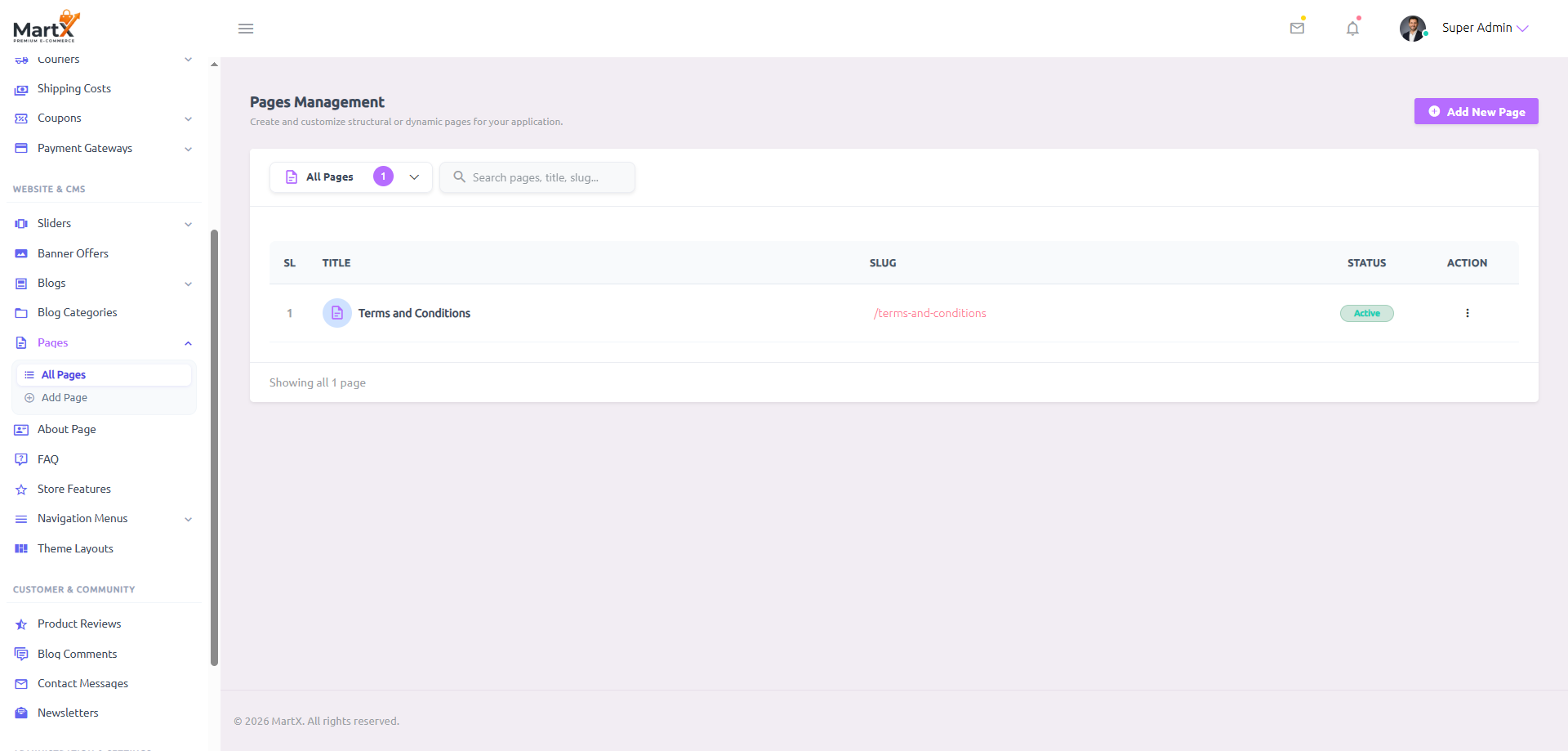
Navigate to: Admin Dashboard → Website Setup → Pages. From here, click + Create Page to launch the authoring canvas.
Pages Registry Anatomy & Field Specifications
| Column / Attribute | Admin Controls & Data Type | System Purpose & Architecture | Storefront Impact |
|---|---|---|---|
| SL / Serial | Sequential ID | Auto-incremented listing order for fast identification in the management grid. | Internal administrative reference only. |
| Title | Text String (e.g., "Terms and Conditions") | The primary human-readable title of the document. Displays prominently at the top of the rendered page. | Rendered as the primary <h1> page header and default HTML title tag. |
| Slug | URL Slug (e.g., terms-and-conditions) |
Unique URL-encoded identifier generated automatically from the title or customized by the admin. | Resolves public access via clean routing: https://yourstore.com/page/{slug}. |
| Status | Active / Inactive Switch | Instant AJAX state controller. Setting to Inactive takes the page offline immediately without deletion. | When Inactive, the public URL returns a clean 404 response and removes links from footers. |
| Actions | Edit / Delete Buttons | Launches the full-page editing suite or prompts a secure two-step modal deletion confirmation. | Edits update live storefront content immediately upon saving. |
16.2 Creating & Editing Pages with Google Gemini AI
Drafting comprehensive e-commerce policies like Privacy Policies or Return Guarantees typically requires hours of legal drafting. MartX features a built-in 1-Click Google Gemini AI Policy Generator directly integrated into the page authoring canvas. With a single click, store information is synthesized into enterprise-grade legal prose.
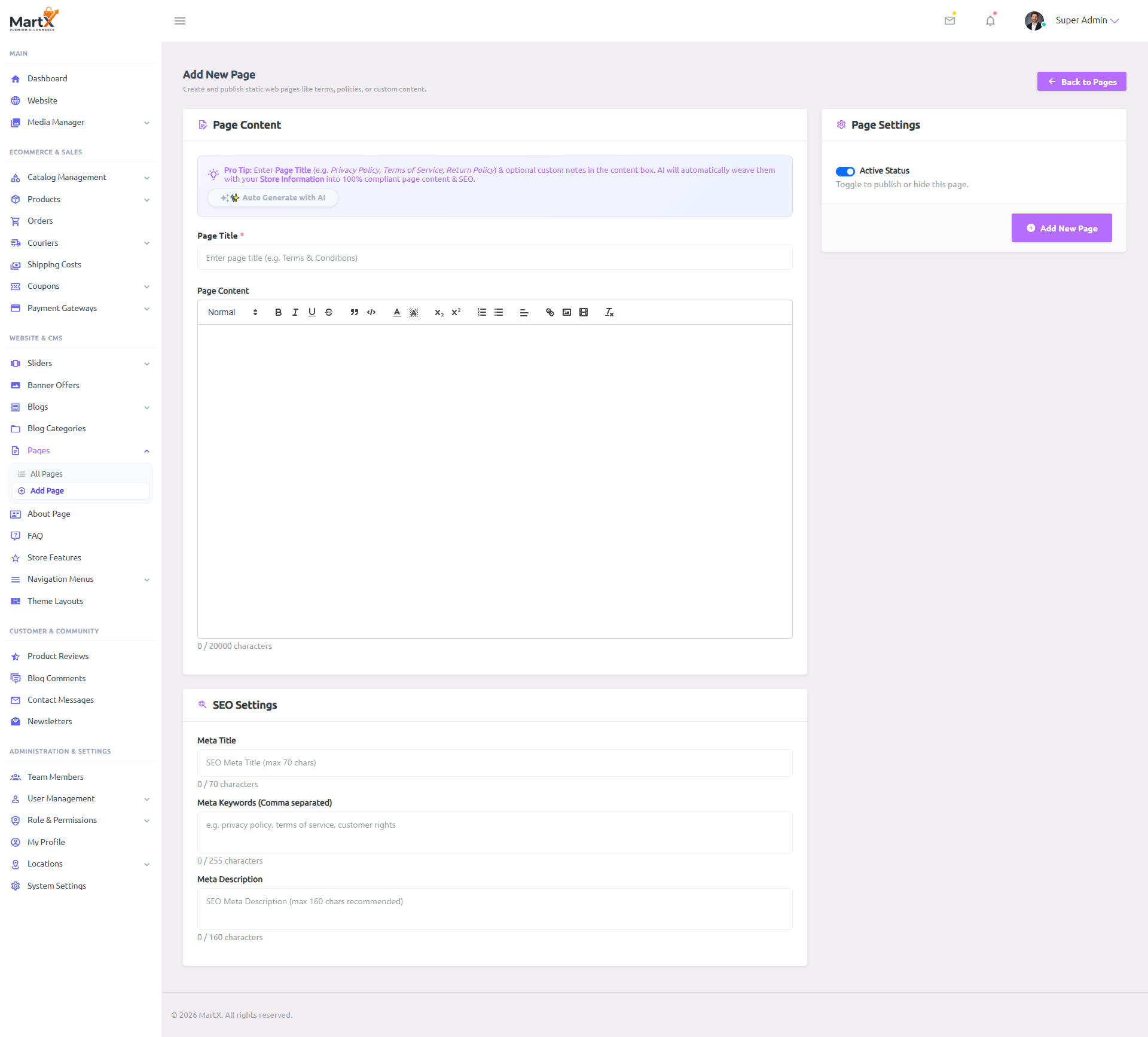
How 1-Click AI Policy Generation Operates
When an administrator enters a page title (e.g. "Privacy Policy", "Return and Refund Policy", or "Shipping Terms") and clicks Auto Generate with AI, MartX executes a background API prompt utilizing Google Gemini 1.5 Flash:
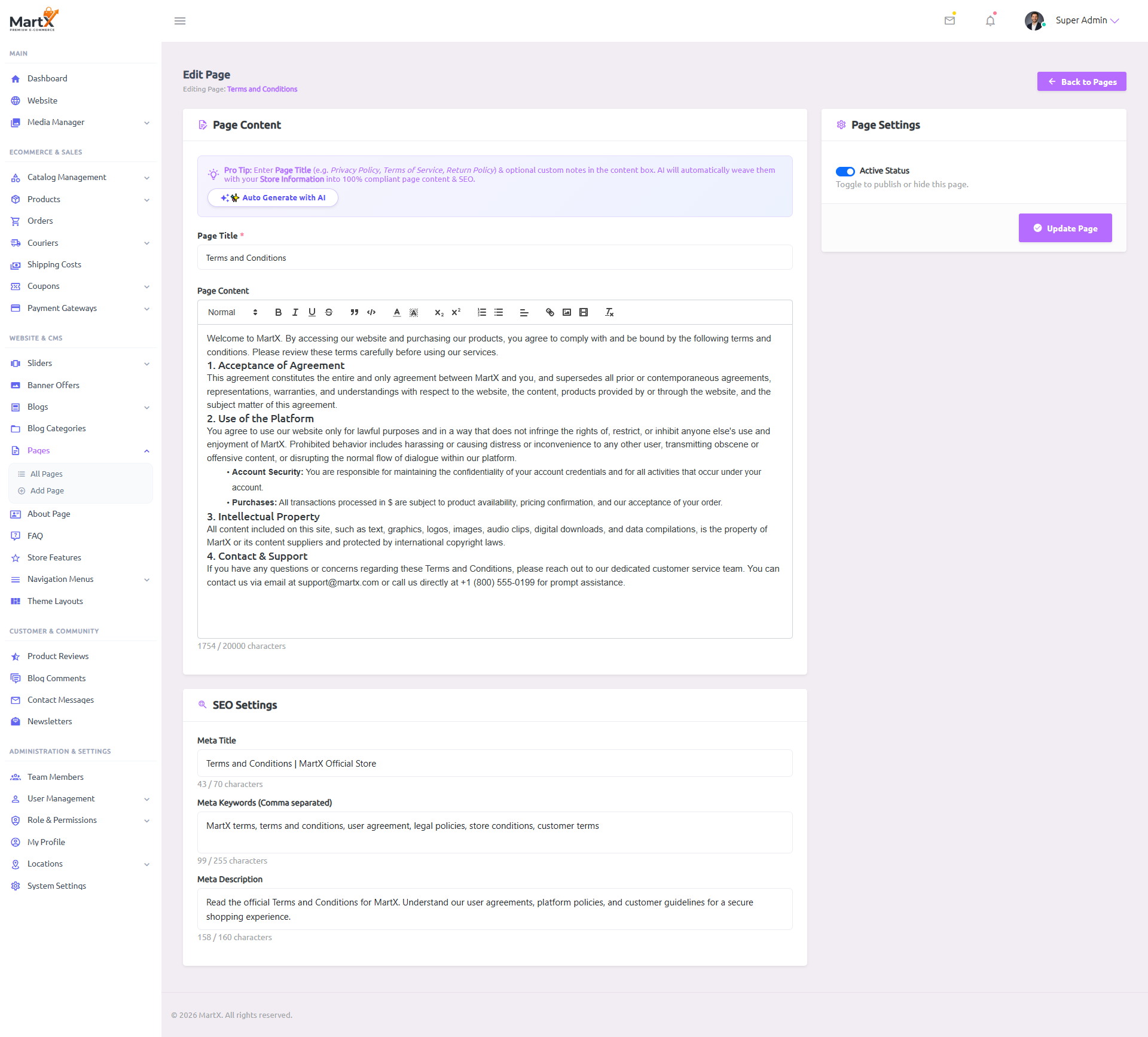
Page Authoring Form Anatomy & Character Limits
| Field Name | Type & Constraints | Description & Validation Rules | Storefront Output |
|---|---|---|---|
| Page Title | string (required)Max 255 Chars |
The primary title. Generates the default permalink slug upon blur if slug field is empty. Includes Automatic Slug Collision Protection: if similar page titles exist, MartX seamlessly appends unique numeric increments (e.g. -1, -2) to prevent duplicate URL conflicts. |
Main page headline, breadcrumb label, and default browser tab title. |
| Page Content | longtext (html)Max 20,000 Chars |
Full-featured Summernote WYSIWYG editor supporting bold, lists, tables, links, images, and raw code view. Features real-time character counter. | Renders sanitized, responsive HTML within the storefront page container template. |
| Meta Title | string (optional)Max 70 Chars |
SEO title tag for search engine result pages (SERPs). Displays a real-time character counter to prevent Google truncation. | Injected into <title> and <meta property="og:title"> head tags. |
| Meta Keywords | string (optional)Comma-separated |
Descriptive keywords indexing the core topic of the document (e.g. "privacy, gdpr, cookies, personal data"). | Injected into <meta name="keywords"> head tag. |
| Meta Description | string (optional)Max 160 Chars |
Search snippet summary. The dynamic counter guides editors to craft snippets under the 160-character desktop snippet limit. | Injected into <meta name="description"> and <meta property="og:description">. |
| Status Toggle | booleanDefault: Active |
Determines whether this dynamic page is publicly discoverable and accessible via direct permalink. | If inactive, visiting /page/{slug} redirects or returns an HTTP 404 response. |
16.3 Multi-Block About Us Page Builder
Rather than requiring store owners to construct an About Us page using raw HTML, MartX provides a dedicated, multi-block About Us Page Builder. This structured interface breaks the public /about-us storefront page into cohesive brand storytelling components: Hero Storytelling, Strategic Pillars, and a dynamic Call-to-Action (CTA) showroom card.
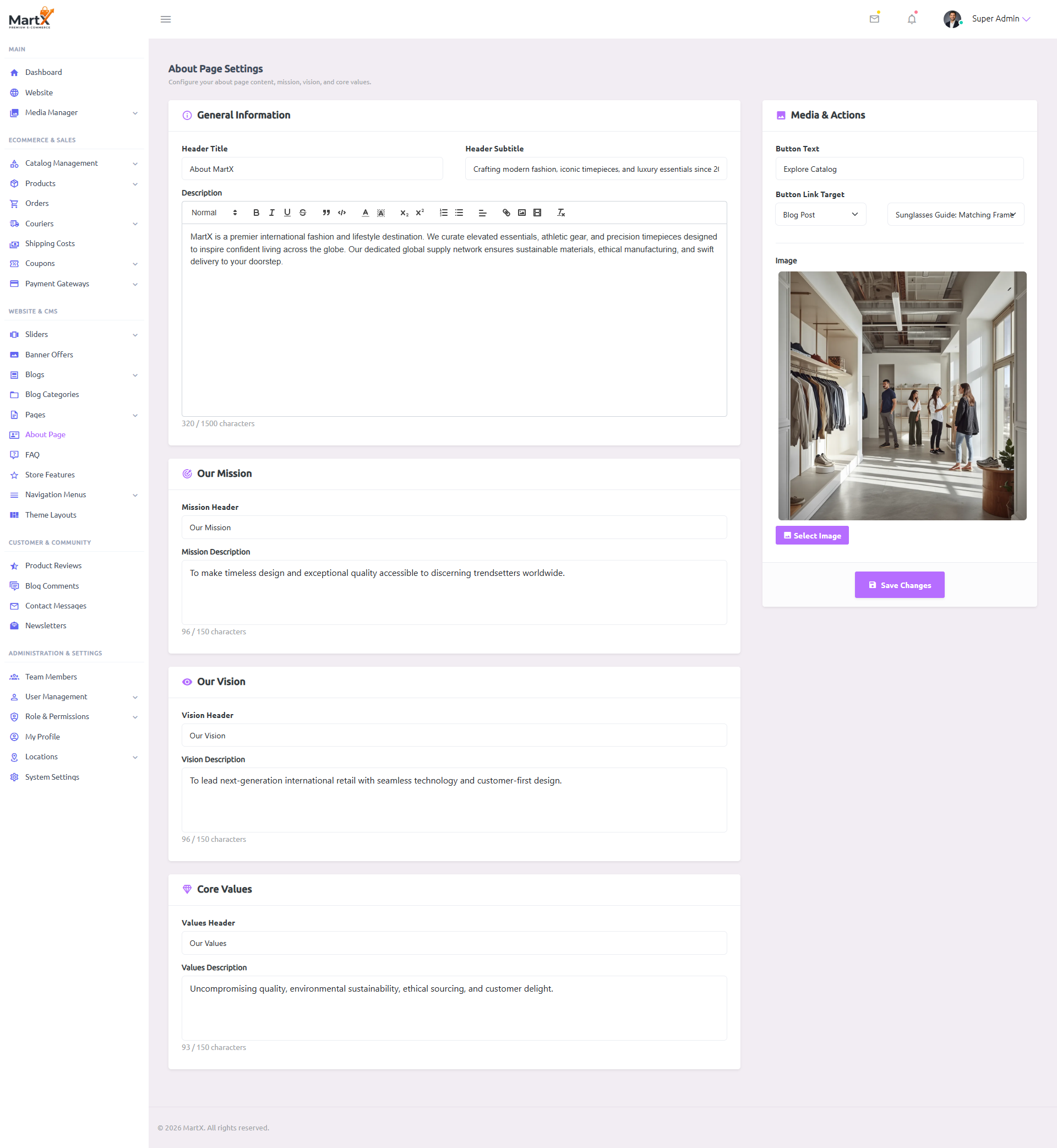
Navigate to: Admin Dashboard → Website Setup → About Us Page. Click Save Changes to publish updates directly to /about-us.
General Brand Story
Defines the hero introduction at the top of the About page:
- Page Title: Hero headline (e.g., "Crafting Extraordinary Shopping Experiences").
- Subtitle: Supporting brand ethos statement.
- About Content: In-depth brand journey, founding philosophy, and craftsmanship narrative.
Strategic Pillars
Structured cards reinforcing enterprise trust:
- Our Mission: Clear actionable commitment to customer satisfaction and quality.
- Our Vision: Forward-looking aspirational statement for brand leadership.
- Core Values: Integrity, customer obsession, and sustainable sourcing standards.
Media CTA Card
High-converting promotional callout card:
- Showroom Image: High-res photo uploaded via MartX Media Modal.
- Button Text: Actionable label (e.g., "Explore Catalog").
- Target Link: Destination routing to store categories, collections, or custom campaigns.
16.4 FAQ Knowledge Base & Live Quick View Modal
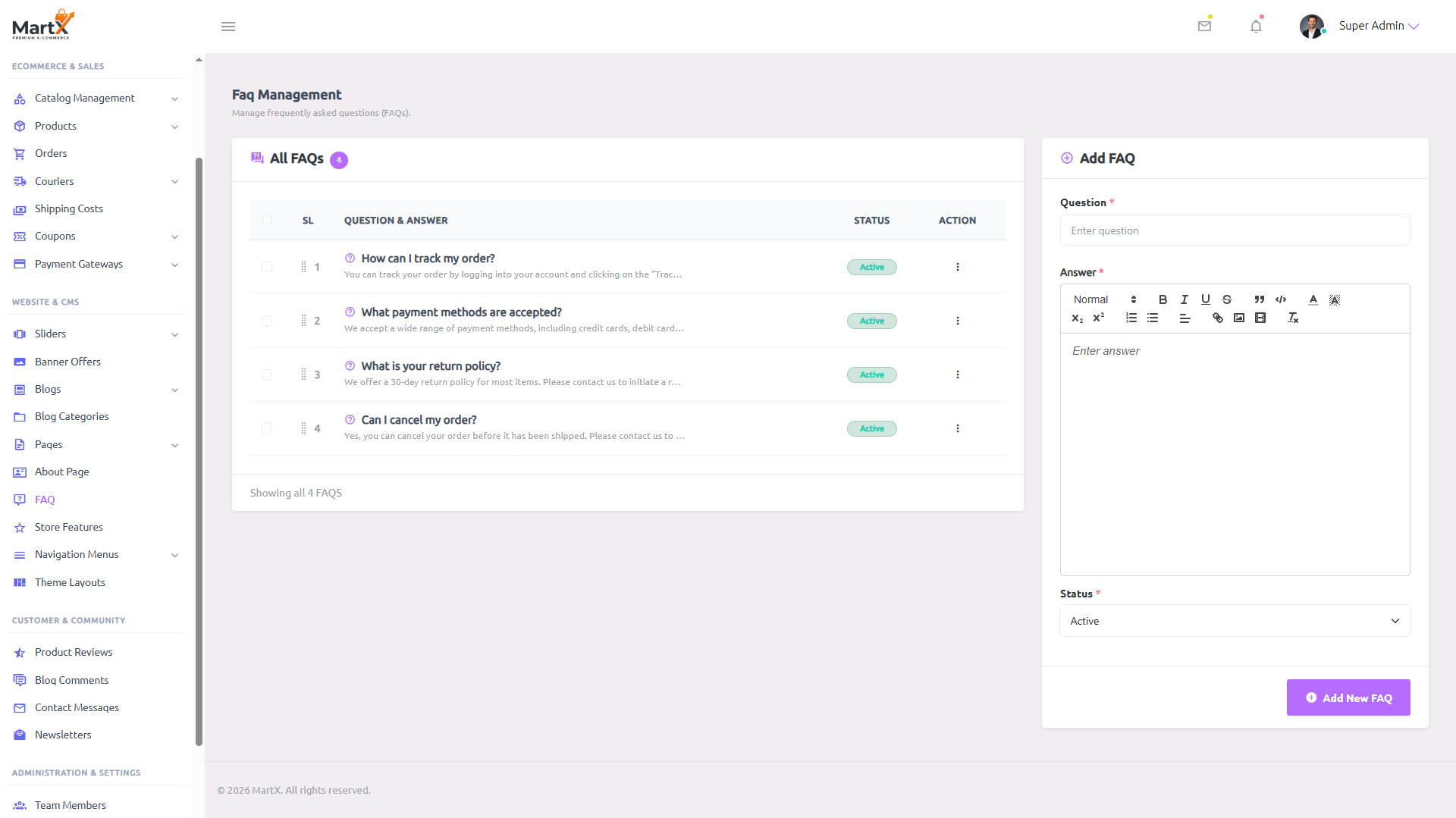
A self-service knowledge base drastically reduces customer support ticket volume. The MartX FAQ Knowledge Base is built on an ultra-efficient dual-column split workspace: the left side provides a sortable questions table with drag-and-drop hierarchy reordering, while the right side delivers a persistent inline creation form.
FAQ Inspection & Modification Modalities
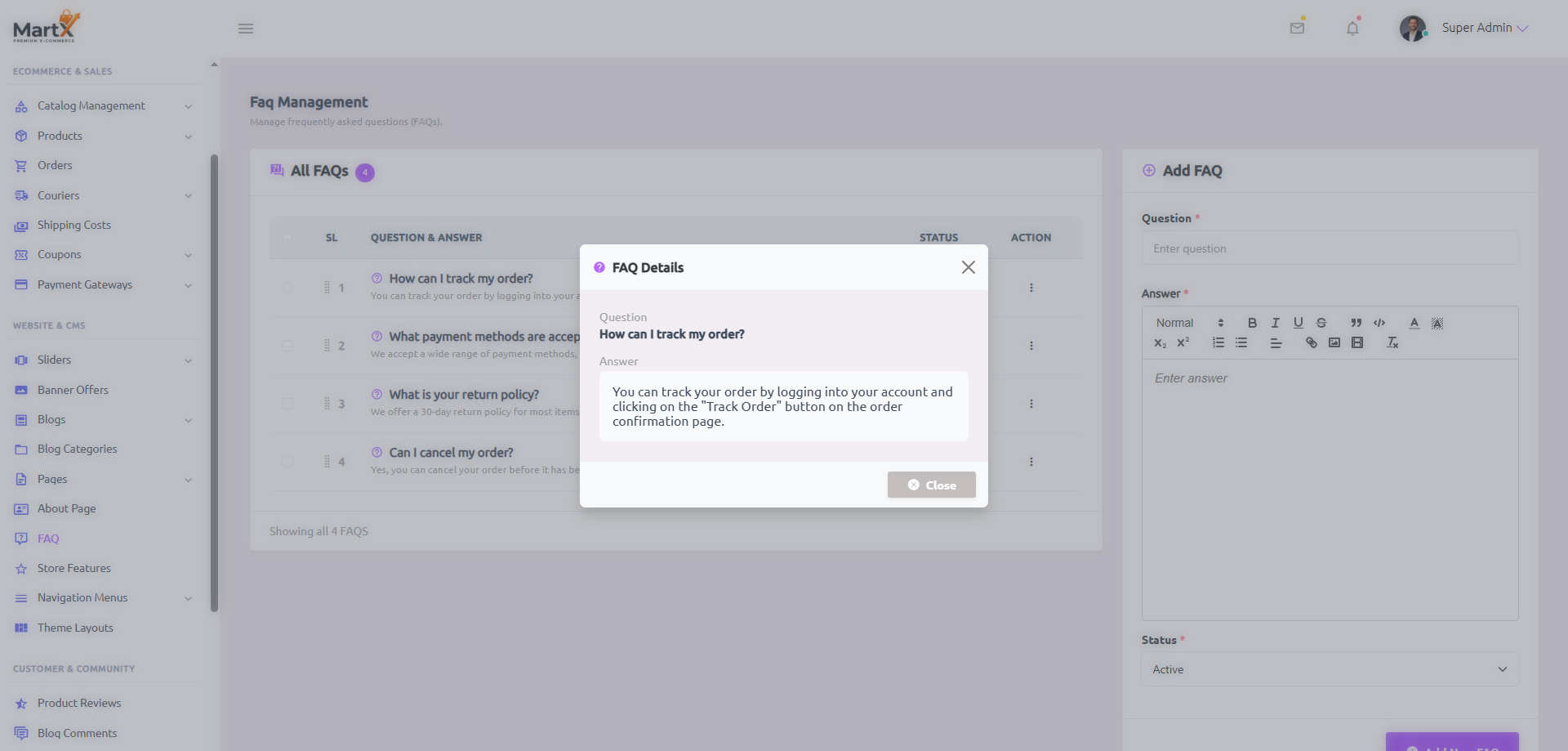
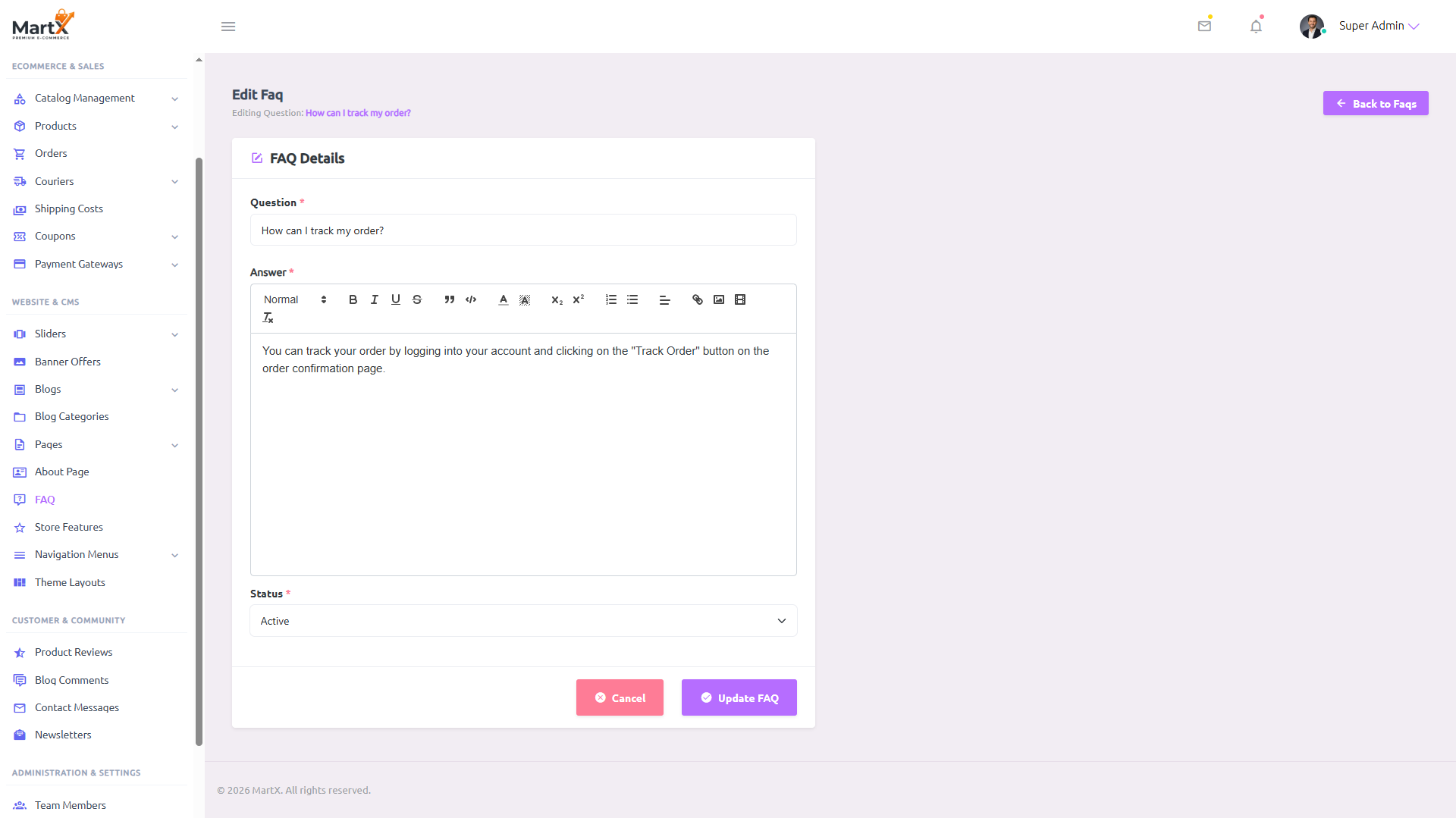
To save administrator time, MartX features two levels of FAQ interaction: an instant zero-reload Quick View Modal for reading answers on the fly, and a dedicated Edit Workspace for comprehensive formatting adjustments.
FAQ Component Field Specifications
| Field / Element | Control Type & Constraints | Operational Behavior | Storefront Display |
|---|---|---|---|
| Drag Handle (::) | Sortable.js Handle | Allows grabbing rows to move them up or down. Releases trigger an asynchronous AJAX reorder request. | Controls the exact accordion order displayed to shoppers on the public FAQ page. |
| Question | string (required)Max 255 Chars |
The customer query (e.g., "How do I track my order?", "What payment methods do you accept?"). | Rendered as the clickable accordion header trigger on the storefront. |
| Answer | text (rich html)Summernote WYSIWYG |
Comprehensive explanatory text supporting ordered lists, tracking hyperlinks, bold emphases, and refund instructions. | Expands smoothly inside the accordion collapse body when the user clicks the question. |
| Status Toggle | booleanActive / Inactive |
Allows temporarily hiding seasonal or deprecated questions without permanently deleting them. | Inactive questions are excluded from storefront accordion renders and live search indexes. |
16.5 CMS Best Practices & SEO Guidelines
To ensure high search visibility, rapid page load speeds, and legal compliance across multiple international jurisdictions, follow these core architectural guidelines when managing MartX CMS assets:
SERP Strict Limits
Keep Meta Titles strictly under 70 characters and Meta Descriptions under 160 characters. MartX real-time counters ensure zero truncation on Google search snippets.
Mandatory Legal Quartet
Every online storefront should maintain at minimum: Terms & Conditions, Privacy Policy, Shipping Policy, and Return & Refund Policy to meet credit card processor requirements.
Optimized Visual Media
Upload optimized WebP or JPG/PNG image assets with consistent aspect ratios for About Us company stories and custom policy pages. This guarantees lightning-fast loading across all devices.
Order Hierarchy
Place high-volume queries (e.g., order tracking and return methods) at the top of the FAQ list using Sortable.js drag handles to resolve customer questions before they file support tickets.