Customer & Community Hub Chapter 18 of 22

Chapter 18: Customer Reviews, Comments & Messages

Product ratings and sentiment telemetry, blog comment approval controls, customer contact inquiry workflows, and Gemini AI-powered email response generation.

Ratings & Sentiment

Aggregate product ratings (1-5 stars), verified purchase badges, telemetry metric cards, and review moderation workflows.

Comment Moderation

Granular auto-approval toggle switch, spam protection, article discussion threads, and instant status management.

Gemini AI Support Studio

1-click inquiry analysis and automated email response drafting with live branded HTML preview and SMTP delivery.

Module Architecture & Workflow

The MartX Customer & Community Suite consolidates all shopper interactions into a unified operational command center. Store managers can monitor customer satisfaction, protect the storefront from spam, maintain high engagement on editorial articles, resolve pre-sales or post-sales inquiries using artificial intelligence, and manage newsletter audiences.

Admin Navigation Paths:
• Admin Dashboard > Customer & Community > Product Reviews
• Admin Dashboard > Customer & Community > Blog Comments
• Admin Dashboard > Customer & Community > Contact Messages
• Admin Dashboard > Customer & Community > Newsletters

18.1 Product Reviews & Rating Moderation

Product reviews build essential social proof, boost buyer confidence, and directly influence conversion rates. The Product Reviews Management console features real-time telemetry cards and filtering tools for moderating customer feedback.

Admin Panel — Product Reviews Management: Telemetry Cards & Rating Ledger
Reviews Engine
Product Reviews Management Directory and Metrics
Total Reviews

97

Cumulative lifetime customer testimonials across all products.

Pending Approval

0

Submitted reviews awaiting administrator safety moderation.

Approved Reviews

97

Live testimonials published and visible on public product pages.

Average Rating

4.7 / 5.0

Aggregate customer satisfaction rating computed storewide.

Admin Panel — Review Details Modal: Customer Rating & Feedback Inspection
Review Details
Product Review View Modal Interface
Review Directory Columns & Parameters
Column / Field Data Type Requirement Operational Description & Front-End Impact
SL Integer Auto-generated Sequential numbering for administrative record display.
Product Relationship System Reference Displays the thumbnail and product title linked directly to the store catalog.
Customer User String Verified Buyer Reviewer's registered customer name. Anonymous reviews are flagged.
Rating Star Score 1 to 5 Stars Numerical rating rendered as golden star glyphs (⭐) on storefront pages.
Status Approved / Pending Toggle Pill Controls public visibility. Clicking toggles between Approved and Pending.
Actions Action Buttons Management Triggers the Review View modal or initiates soft-deletion.
Verified Buyer Pipeline & Multi-Purchase Architecture

To eliminate review fraud, astroturfing, and competitors submitting fake feedback, MartX implements a cryptographic order-verified review gating system:

Delivered Order Required

Reviews cannot be submitted for Pending, Processing, or Shipped orders. A customer must possess at least one completed purchase in Delivered status. Unverified or guest attempts are blocked instantly.

Multi-Purchase Eligibility

If a loyal customer orders the same item across multiple separate transactions, each fulfilled delivery grants an independent review allocation (the system automatically verifies fulfilled deliveries against prior reviews submitted).

Storefront Verified Badge: Approved reviews originating from authenticated orders display the prominent Verified Purchase badge, elevating credibility and driving higher organic conversion.
Customer Photo Gallery & Admin Moderation Modal
Real-Product Customer Photo Uploads

Shoppers can upload up to 5 authentic product photos alongside their written testimonial. The MartX media engine validates file types (JPEG, PNG, WebP ≤ 2MB) and converts them into optimized WebP formats stored safely in public media assets.

Interactive Admin Photo Inspector

The Admin Review Details Modal dynamically renders interactive photo thumbnails. Store moderators can click to inspect product condition, verify authenticity, and identify potential image guideline violations prior to publishing.

Photo Pipeline Specs WebP Optimized
  • Max 5 photos per submission
  • Validated MIME: jpeg, png, webp
  • Secure multi-asset storage
  • 1-click modal thumbnail lightbox
Official Store Replies & Anti-Spoofing RBAC Enforcement

Public responses from the merchant display a high-authority Store Response badge on the product page. To prevent malicious actors from posing as store representatives, strict authorization guards are enforced:

Security Layer Permission Required Action on Unauthorized Attempt
Customer Reply Form Verified Staff Account with "Reply to Review" Permission Submission blocked with 403 Forbidden
Identity Spoof Guard Store Administrator or Delegated Staff Role Rejects forged requests and records security event log
Performance Optimization Single-Query Customer & Reply Sync Instantly renders nested replies without server latency

18.2 Blog Discussion & Comment Moderation Engine

Active blog engagement drives organic search rankings and community trust. The Blog Comments console gives administrators full control over discussion threads with auto-approval safety toggles.

Admin Panel — Blog Comments: Global Auto-Approval Settings & Comment Ledger
Comments Hub
Blog Comments Management and Settings Card
Auto-Approval Control & Anti-Spam Strategy
If enabled, new blog comments will be published immediately without waiting for admin approval.
Security Best Practice: While Auto Approve accelerates community engagement, stores experiencing high bot traffic should leave this switch OFF to review comments manually before public rendering.
Admin Panel — Comment Details Modal: Reader Feedback & Blog Context
Comment Inspector
Blog Comment View Details Modal
Comment Modal Parameters:

18.3 Contact Messages & Customer Support Ledger

Shoppers frequently submit inquiries regarding sizing, return windows, B2B wholesale pricing, or international delivery. The Contact Messages directory serves as a centralized help desk ticketing inbox.

Admin Panel — Contact Messages: Customer Inquiries & Status Badges
Messages Directory
Contact Messages Management Ledger
Status Badge Visual Indicator Operational Workflow & Help Desk State
Unread Unread Newly received message requiring staff triage. Triggers top-bar notification counter.
Read Read Message has been opened and inspected via modal or reply view, but no outgoing response has been transmitted yet.
Replied Replied Staff member has composed and dispatched an official email reply. Ticket is marked resolved.
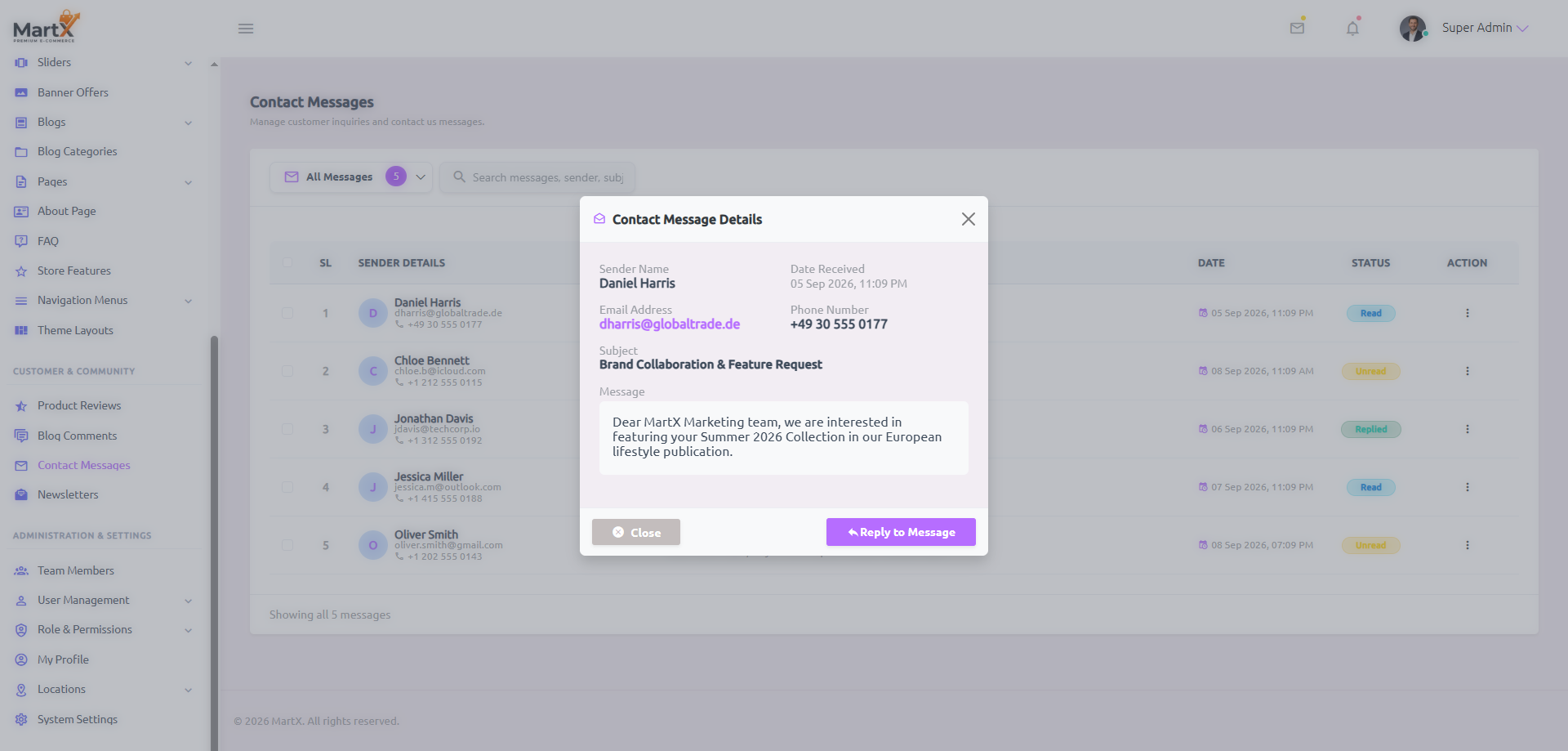
Admin Panel — Contact Message Details Modal: Inquiry Inspection & Fast Reply Trigger
Message Inspector
Contact Message View Details Modal

18.4 Gemini AI Email Reply Studio & Live HTML Template Preview

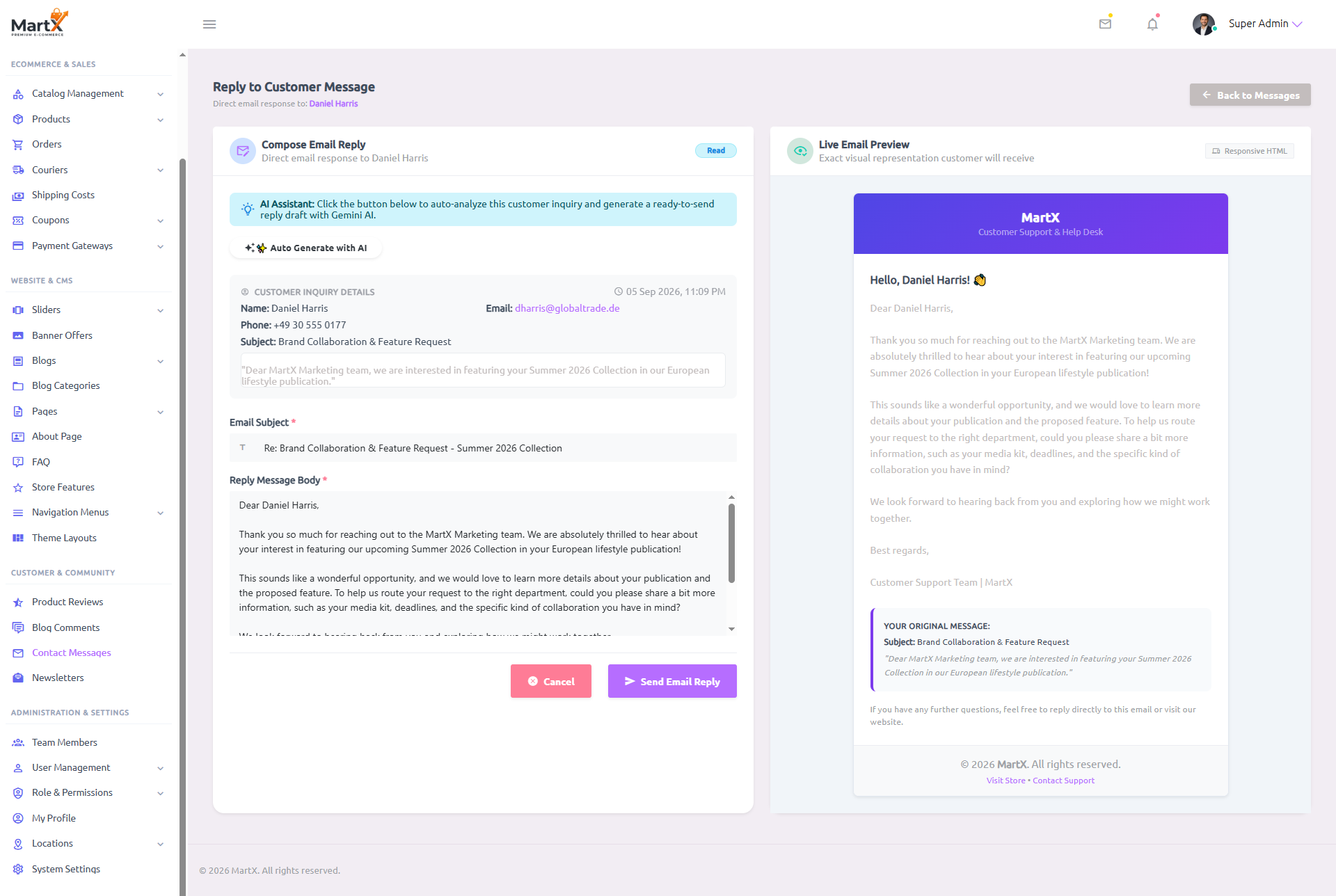
MartX pioneers integrated AI customer service. When viewing any contact message, clicking Reply to Message directs the administrator into the Reply Studio, featuring one-click AI draft generation and real-time responsive HTML email previewing.

Admin Panel — Reply to Customer Message: Gemini AI Assistant & Live Branded Email Preview
Gemini AI Studio
Contact Message Reply Studio with Gemini AI and Live HTML Preview
AI Customer Specialist
Gemini AI Support Specialist: Workflow Architecture

When an administrator clicks ✨ Auto Generate with AI on the reply screen:

  1. Context Extraction: The customer's full name, email address, original inquiry subject, and inquiry text are packaged and sent to the endpoint admin.contact-message.generate-ai-reply.
  2. Persona-Driven Reasoning: Google Gemini assumes the persona of a Senior Customer Support Specialist for your store brand, generating:
    • An appropriate email subject line prefixed with Re:.
    • A personalized greeting addressing the customer by their first name.
    • An empathetic, polite response directly resolving their inquiry.
    • An official sign-off with the store's customer support signature.
  3. DOM Synchronization: The subject input and message textarea are filled instantly.
  4. Live HTML Template Sync: The right-side Live Email Preview updates in real-time, rendering the exact responsive HTML template the customer will receive in their inbox.
Field / Component Type & Limit Mandatory Operational Functionality & Validation
Email Subject Text Input (Max 255) Required Specifies the outgoing SMTP email subject line. Automatically pre-filled with Re: [Original Subject] or populated by Gemini AI.
Reply Message Body Textarea (9 Rows) Required Main content of the reply email. Supports custom editing, manual refinement, or 100% AI generation.
Live Email Preview Interactive Component Visual Aid Re-renders on every keystroke, showing branded header banner, greeting, body copy, quoted inquiry block, and store footer links.
Send Email Reply Submit Button Action Dispatches email via queued SMTP, marks the ticket status as Replied, and logs the outbound transmission timestamp.

18.5 Newsletter Subscribers & Audience Management

Email marketing delivers the highest ROI in e-commerce. The Newsletters module captures email subscribers from storefront footer forms and checkout opt-ins.

Admin Panel — Newsletters: Subscriber Directory & One-Click CSV Export
Audience & CSV
Newsletter Subscribers Ledger and CSV Export
One-Click CSV Export

Export clean subscriber lists with timestamp data for immediate import into Mailchimp, Klaviyo, Brevo, or SendGrid campaigns.

Subscription Status

Easily toggle subscriber status between Subscribed and Unsubscribed to respect customer privacy preferences.

Instant Email Search

Search subscriber records by full or partial email address to handle customer unsubscribes or manual profile updates.

18.6 Customer Interaction & Moderation SOP

To maintain 5-star customer satisfaction and ensure brand integrity, customer success agents should execute this daily 5-step Standard Operating Procedure:

Step 1: Daily Inbox & Review Audit

Review the top-bar notification count for new contact inquiries and check the Pending Approval metric card on Product Reviews.

Step 2: Review Moderation

Inspect star ratings and feedback text in the Review Modal. Approve legitimate buyer feedback or reject spam.

Step 3: Blog Comment Moderation

Audit new comments under Blog Comments. Verify compliance with store community guidelines before approving.

Step 4: AI Reply Generation

Open Unread Contact Messages, click Reply to Message, and use ✨ Auto Generate with AI to draft responses.

Step 5: Preview & Dispatch

Verify the generated response against the Live Email Preview and click Send Email Reply to resolve the ticket.

Step 6: Audience Sync

Perform weekly exports from Newsletters via Export CSV to synchronize marketing subscriber databases.

18.7

Customer Account Self-Service Security & Decoupled Address Hub

Empowering customers with privacy controls builds brand trust while reducing routine support tickets. MartX provides a self-service customer suite engineered for international privacy compliance (GDPR/CCPA) and frictionless checkout:

Privacy Compliance: Self-Service Account Deletion via Email OTP
3-Attempt Lockout Active

Customers can initiate self-service account termination directly inside their storefront account profile under Settings → Security. To prevent account takeovers and unauthorized deletion, MartX enforces a 4-tier security verification workflow:

6-Digit Email OTP

Clicking "Delete Account" generates a unique, one-time 6-digit confirmation code dispatched directly to the customer's registered email inbox.

60-Second Cooldown

The "Resend Code" button enforces a strict 60-second cooldown timer, preventing accidental button flooding and protecting your outgoing mail server.

3-Attempt Lockout

Entering 3 consecutive invalid OTP codes automatically locks the deletion modal for 30 minutes, thwarting automated brute-force attacks.

Financial Audit Safe

Personal credentials and login sessions are wiped immediately, while historical order receipts and tax audit records are preserved anonymously for regulatory accounting.

Decoupled Customer Address Book Architecture
Multi-Destination Ready

Older e-commerce scripts frequently lock address inputs to strict courier pricing rules, causing checkout crashes when customers reside outside predefined delivery boundaries. MartX implements an independent, decoupled address engine:

Multi-Address Storage

Shoppers can save, label, and manage multiple delivery profiles (e.g., "Home", "Corporate Office", "Alternative Recipient") directly in their customer account.

Geographic Independence

State, province, city, and postal code fields accept custom customer input cleanly without requiring advance shipping rate configurations for every global territory.

1-Click Checkout Autofill

During checkout, the customer's primary address pre-populates instantly with zero typing required, reducing mobile cart abandonment and speeding up order completion.

18.8 Storefront 24/7 AI Shopping Assistant & WhatsApp Live Chat Hub

MartX provides an omni-channel customer interaction experience directly on the public storefront. Combining autonomous conversational intelligence with instant human escalation guarantees high conversion rates, immediate support response, and frictionless buyer self-service.

24/7 AI Shopping Assistant (<x-web.ai-chat-widget />)

Powered by a resilient Google Gemini 4-model fallback cascade (gemini-3.5-flash-lite → gemini-3.6-flash → gemini-2.5-flash → gemini-3.7-flash). Automatically advises shoppers on sizing, recommended pairings, and catalog inventory with zero credit card required.

Anti-Abuse Rate Limit: Protected by throttle:30,1 (max 30 requests/minute per client IP) to guard against API quota exhaustion.
1-Click WhatsApp Live Agent Escalation

Customers seeking human support can instantly open a direct conversation with your support desk via the floating WhatsApp trigger. Pre-fills an instant greeting message automatically configured in System Settings → AI & Live Chat.

Frictionless Handoff: Deep-links directly to WhatsApp Web on desktops or the native WhatsApp app on iOS and Android devices.
Deterministic Real-Time Order Tracking (Zero Hallucination Guarantee)

Traditional LLM chatbots frequently hallucinate fictitious delivery dates or wrong payment states. MartX implements a strict, deterministic regex interception engine:

Deterministic Logic How Order Tracking Queries Are Processed:
  1. When a customer types an order query containing #ORD-... or ORD-..., AiChatService::handleOrderTracking() intercepts the prompt before sending it to Google Gemini.
  2. The system queries the real database record directly, fetching live status (Pending, Processing, Delivered), item count, and formatted currency total.
  3. Returns an accurate, structured message with real data and appends a direct WhatsApp handoff button pre-filled with: "Regarding Order #ORD-XXXXX".
  4. Privacy Guard: Strict zero-customer-PII leakage guarantee — customer phone numbers, physical addresses, and payment card details are never exposed in AI chat responses.
Previous: Chapter 17 (Blogs & Editorial) Next: Chapter 19 (Multi-Staff & Roles)
Documentation
⚡ 3-Minute Quick Start 1. Introduction & Overview 2. Server Requirements 3. Installation Guide 4. License Activation 5. Dashboard Telemetry 6. Media Manager 7. Catalog Management 8. Products Management 9. Orders & Fulfillment 10. Couriers & Shipping Costs 11. Coupons & Marketing 12. Payment Gateways 13. Theme Layouts Hub 14. Navigation & Mega Menus 15. Sliders & Banners 16. Pages, FAQ & About 17. Blogs & Editorial 18. Reviews & Messages 19. Team Members & Staff Roles 20. Locations & Coverage 21. System Settings Hub 22. Web Cron & FAQs 23. Extra Security & Speed Boost