
Chapter 17: Blogs & Editorial Content Publishing
High-converting blog articles, integrated Google Gemini AI Studio, hierarchical topic taxonomies, rich-media Quill WYSIWYG publishing, and search engine optimization (SEO) metadata engineering.
Gemini AI Studio
Automate long-form article drafting, headings, practical tips, and SEO meta tags in under 3 seconds using the integrated AI assistant.
Quill WYSIWYG Editor
Full-featured rich text authoring with video embeds, media manager pictures, bullet formatting, quotes, and 20,000-character capacity.
SERP & SEO Engine
Granular meta title, keyword, and description counters with real-time length monitoring for optimal Google search click-through rates.
Module Architecture & Workflow
The MartX Editorial Suite empowers digital merchants to establish organic brand authority, educate prospective buyers, and dominate organic search engine rankings. With deep catalog linkages, articles can guide shoppers from initial awareness straight into product checkout flows.
17.1 Blog Category Architecture & Split Console
MartX employs a dual-column split management console for Blog Categories. The left column presents an interactive, searchable category directory with article count badges, while the right column houses a persistent, zero-friction creation panel.

Category Directory Columns & Parameters
| Column / Field | Data Type | Requirement | Operational Description & Front-End Impact |
|---|---|---|---|
| SL | Integer | Auto-generated | Sequential row identifier strictly for administration sorting and cataloging. |
| Category Name | String / Varchar | Required | The human-readable label rendered on storefront blog tags, filter pills, and navigation menus. |
| Total Articles | Counter Badge | System Metric | Live count of active articles associated with this category. Prevents accidental orphan categorization. |
| Status | Active / Inactive | Toggle | Controls public visibility. Deactivating hides all associated blogs from storefront category feeds. |
| Actions | Action Buttons | Management | Provides one-click triggers for AJAX Edit Modal opening and soft-deletion with foreign key checks. |
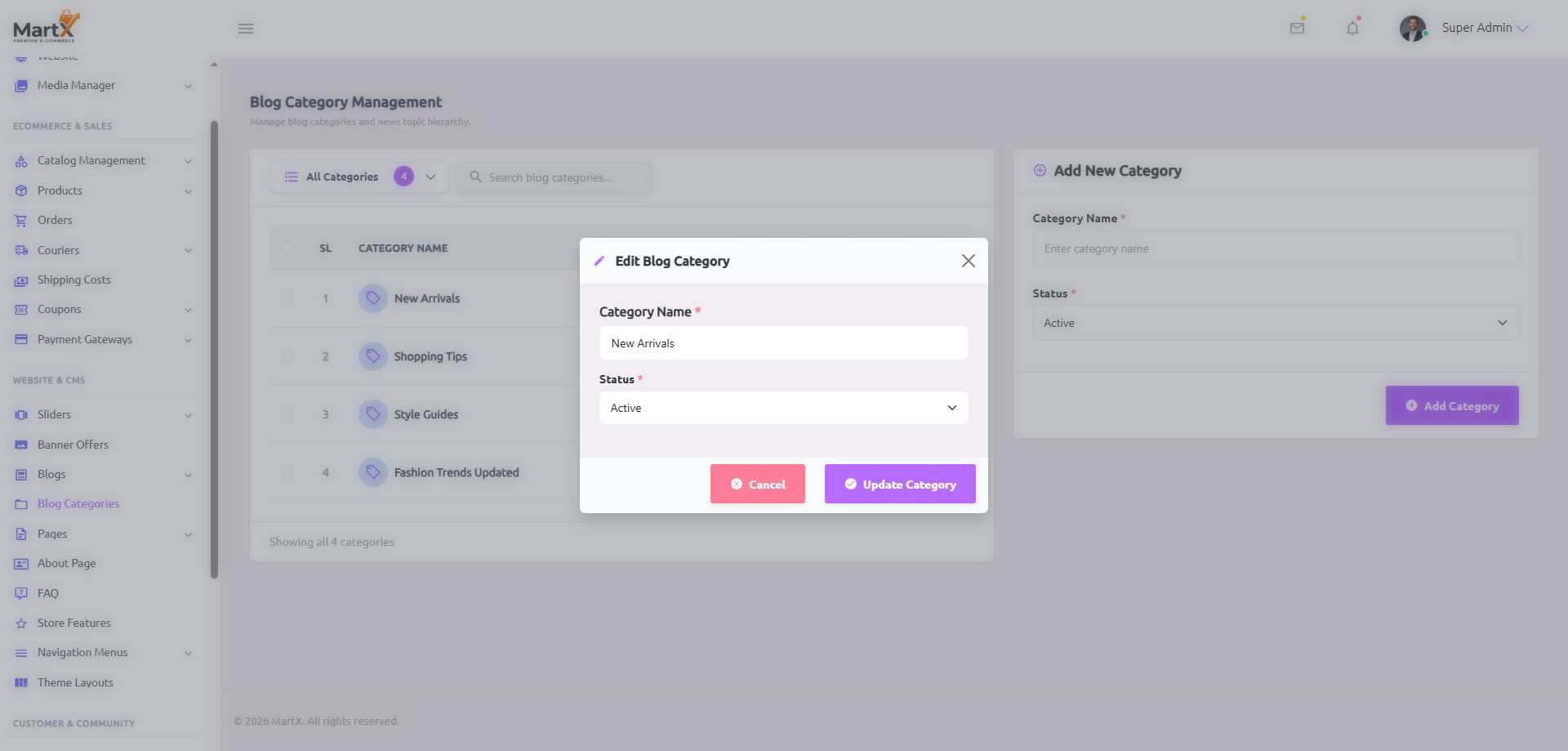
Dynamic Inactive Warning Safety Mechanism
When an administrator switches a category status to Inactive (either in the Add Form or the Edit Modal), MartX immediately reveals a contextual warning banner:
- Public Navigation Concealment: The category is immediately removed from storefront top navigation bars, footer links, and sidebar category widgets.
- Storefront Filtering: Associated articles will not be served on public category browsing pages.
- Draft Safety: Existing article associations and database relations remain 100% intact and will immediately restore upon reactivating the category.
17.2 Editorial Directory & Article Ledger
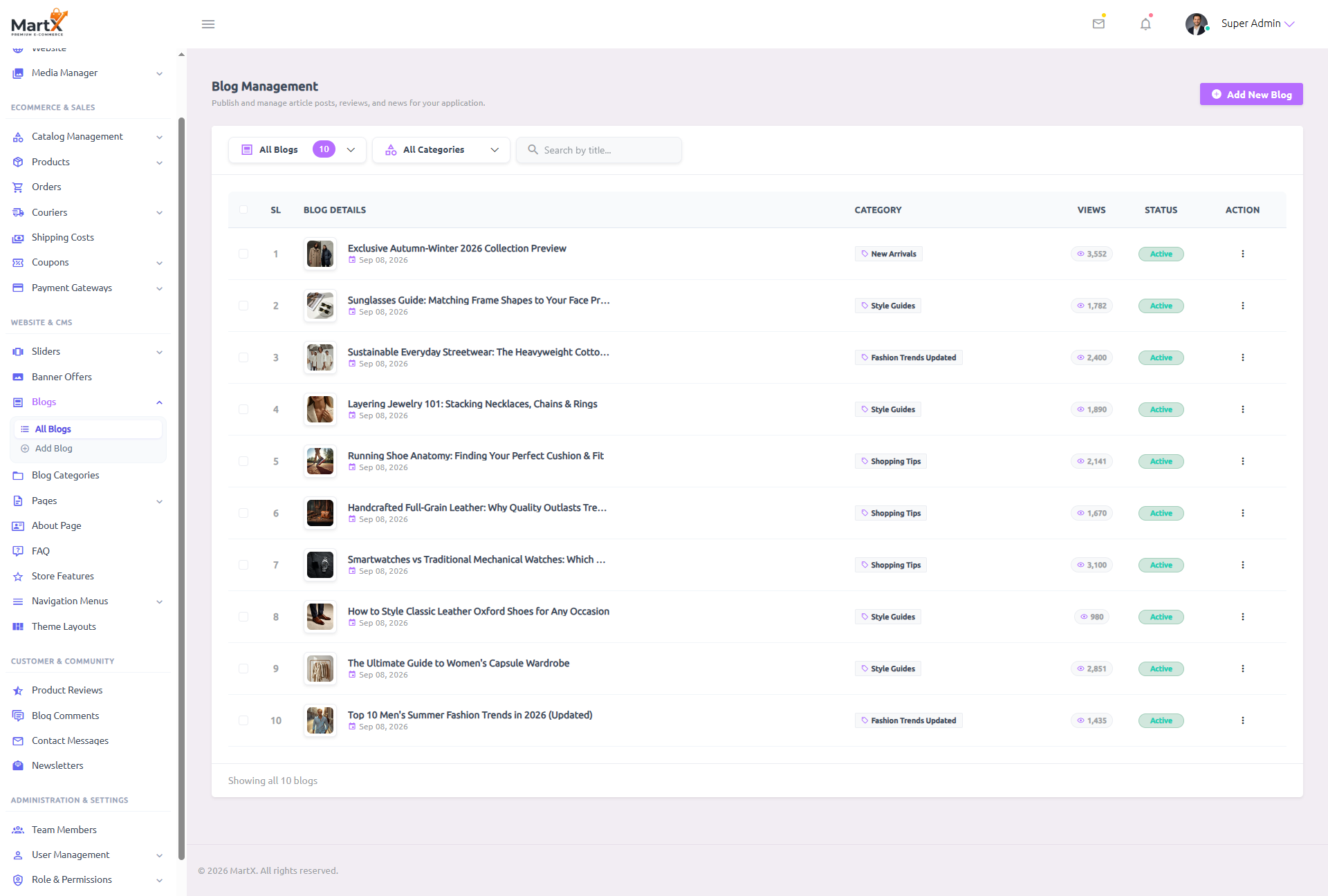
The Blog Management Directory provides a centralized control hub for all published stories, seasonal lookbooks, style guides, and customer tutorials across your digital storefront.
Status Filtering
Filter between All Blogs, Active (published articles), and Inactive (drafts) with instant row refresh.
Category Segmentation
Isolate articles by topic (e.g., Style Guides, New Arrivals) to streamline editorial audits and updates.
Live Title Search
Type any headline keywords into the search box to pinpoint specific articles instantly without reloading the page.
| Table Column | Visual Representation | Operational Functionality & Behavior |
|---|---|---|
| Bulk Select [ ] | Checkbox | Allows administrators to select multiple articles for bulk status updates or batch deletion actions. |
| Blog Details | Thumbnail (48x48) + Title + Date | Displays the featured image with hover-zoom, title truncated for responsive layouts, and publication timestamp (e.g., Sep 08, 2026). |
| Category | Category Name | Identifies the primary topic taxonomy under which the article is filed on the storefront. |
| Views | 3,552 | Real-time visitor telemetry tracking unique and repeat storefront pageviews for measuring editorial engagement. |
| Status | Active | Visual pill badge indicating whether the post is live on the public storefront or retained in administrative draft mode. |
| Action | Dropdown Menu | Provides direct navigation to Edit Blog or triggers a secured confirmation dialog for Delete. |
17.3 Article Creation & Gemini AI Content Studio
Creating high-quality content at scale is accelerated by the MartX Gemini AI Content Studio. By analyzing your chosen blog category and article headline, the AI engine drafts a publication-ready article and complete SEO metadata in a single click.

Gemini AI Studio: Architecture & Execution Pipeline
The AI Studio container sits directly atop the Blog Content card. It continuously observes form inputs and offers intelligent state guidance:
Pro Tip Optimization
The studio displays the guideline: "Select Category & enter Blog Title for 95%+ accurate AI Article & SEO generation." Supplying category context ensures the AI writes with specific industry vocabulary.
Smart Tooltip & Key Validation
If the GEMINI_API_KEY is missing in System Settings, the button is disabled with tooltip: ⚠️ Please configure Gemini API Key in Settings first. When the title has fewer than 3 characters, the button remains locked with a gentle prompt.
What Happens When You Click "Auto Generate with AI":
- Asynchronous API Dispatch: A secure AJAX request is transmitted to
admin.ai.generate-contentwith the title, category context, andtype: 'blog'. - Contextual Prompt Engineering: The backend formats a role-based prompt directing Gemini to act as an Elite E-Commerce Content Marketer & SEO Journalist for the current store name.
- Structured JSON Response: Gemini returns a clean payload containing:
content: Comprehensive HTML article with an engaging hook, "Why This Matters" section, practical steps/tips with ordered lists, and an inspiring conclusion with a subtle store CTA.meta_title: High-CTR SEO headline under 70 characters.meta_keyword: 6 to 8 comma-separated search tags.meta_description: Compelling search snippet under 160 characters.
- Instant Form Synchronization: The Quill WYSIWYG editor, hidden form inputs, and all 3 SEO textareas are populated automatically with updated live character count meters.
Comprehensive Input Fields Reference
| Field Name | Type & Limit | Mandatory | Detailed Operational Behavior & Validation |
|---|---|---|---|
| Blog Title | Text Input (Max 255) | Required | The primary editorial headline of the article. Must be clear and captivating. Unlocks the AI Studio generator once at least 3 characters are typed. |
| Blog Content | Quill WYSIWYG Editor (Max 20,000) | Optional | Full rich-text body. Supports heading levels, typography formatting (bold, italic, underline, strike), code blocks, blockquotes, bullet/numbered lists, hyperlinks, embedded YouTube videos, and photos from the Media Manager. |
| Meta Title | Textarea (Max 70 chars) | Recommended | Specifies the HTML <title> tag for search engines. Live character counter warns if the title exceeds standard 70-character SERP display limits. |
| Meta Keywords | Textarea (Max 255 chars) | Optional | Comma-separated search keywords and taxonomy indexing tags (e.g., fashion tips, summer trends 2026, wardrobe essentials). |
| Meta Description | Textarea (Max 160 chars) | Recommended | The 1-2 sentence preview snippet displayed on Google and social media sharing cards. Features a live character counter optimized for the 160-character search boundary. |
| Category | Select Dropdown | Required | Assigns the article to an active topic taxonomy. Crucial for organizing archive pages and storefront breadcrumbs. |
| Featured Image | Media Manager Picker | Optional | High-resolution cover image displayed in card grids and article headers. Fixed 5:3 aspect ratio ensures crisp, uniform presentation across mobile and desktop displays. |
| Status | Select Dropdown (Active/Inactive) | Required | Default is Active (immediately visible on public storefront). Selecting Inactive saves the post as an administrative draft. |
17.4 Article Revision, Rich Media & Publishing Lifecycle
Editorial content requires ongoing revisions, image refreshes, and seasonal updates. The Edit Blog interface retains existing content while allowing continuous regeneration via AI or manual copy editing.

Featured Image Curation
The Featured Image picker interfaces directly with Chapter 6: Media Manager. Administrators can select existing WebP thumbnails or upload fresh high-resolution artwork.
- Optimized aspect ratio:
5:3(e.g., 1000px × 600px). - Supports WebP, PNG, JPG formats with automated multi-size thumbnail generation.
Inactive Category Protection
If an article's assigned category is later marked inactive, the edit screen alerts the editor:
The administrator can simply reassign the article to another active category to restore full storefront visibility.
What Occurs When Setting a Blog to Inactive:
- Instant Unpublish: The post is immediately removed from the storefront blog index, recent post carousels, and category archives.
- Direct URL Protection: Public visitors attempting to visit the slug directly will receive a 404 Not Found error.
- Draft Preservation: All rich-text markup, user comments, views metrics, and SEO metadata are securely preserved in the database for future republication.
Reader Discussions & Anti-Spam Comment Moderation
Engaging reader comments build community and organic search rankings. MartX protects the blog discussion feed with automated spam defenses and a dedicated admin moderation hub:
Bot Flooding Protection
Public comment submissions are protected by intelligent rate limiting, restricting automated bots and aggressive submission scripts to safeguard your mail server and database.
Three-Tier Moderation States
Inside Admin → Blog Comments, editors can filter incoming feedback across three distinct workflow stages: Pending (unapproved), Approved (live on storefront), or Rejected (hidden spam).
17.5 Search Engine Optimization (SEO) & Metadata Engineering
MartX is engineered for aggressive organic search dominance. Every article includes dedicated metadata fields that feed directly into HTML header tags and OpenGraph social preview cards.
Real-Time Google SERP Simulator
Desktop & Mobile PreviewExclusive Autumn-Winter 2026 Collection Preview | MartX Journal
Get an exclusive first look at our upcoming Autumn-Winter 2026 drops. Featuring double-faced Italian wool overcoats, waterproof insulated parkas, and shearling-lined boots...
| Metadata Attribute | Recommended Character Limit | SEO Best Practice & Search Impact |
|---|---|---|
| Meta Title | 50 - 70 characters |
Crucial ranking signal. Include primary target keywords near the beginning and append brand identifier (e.g., | MartX Journal). |
| Meta Keywords | Under 255 characters |
Comma-separated keywords used for internal site search ranking and secondary indexing algorithms. |
| Meta Description | 140 - 160 characters |
The search snippet that drives click-through rate (CTR). Must include a persuasive call-to-action without getting truncated on mobile SERP displays. |
17.6 Content Marketing & Editorial Publishing SOP
To ensure high editorial standards, search visibility, and maximum buyer conversions, marketing teams should execute this 6-step publishing SOP for every new story:
Navigate to Add New Blog and select an active category from the right sidebar dropdown to anchor article taxonomy.
Input a compelling headline in Blog Title. MartX includes Automatic Slug Collision Protection: if identical titles exist, it seamlessly appends incremental numbers (e.g. -1, -2) to ensure collision-free permalinks.
Click ✨ Auto Generate with AI to generate the full article, structured headings, tips, and SEO meta tags.
Review the generated text in the Quill WYSIWYG editor. Add store product hyperlinks, brand voice touches, or video embeds.
Click Select Image to choose an eye-catching 5:3 aspect ratio cover photo from the MartX Media Manager.
Ensure Status is set to Active and click Save & Publish Blog. Verify immediate appearance on your public blog storefront.