
Chapter 9: Orders Processing & Lifecycle Fulfillment
Lifecycle order processing, real-time status transitions, invoice generation, and customer dispatching.
Production Ready
Engineered for mission-critical enterprise commerce with zero latency overhead.
Granular Controls
Fully customizable via the modern MartX Admin Dashboard with real-time feedback.
Instant Sync
Automated state propagation across multi-device clients, cache, and database layers.
Module Architecture & Workflow
This chapter details the comprehensive configuration, operational controls, and best practices for Chapter 9: Orders Processing & Lifecycle Fulfillment. Follow the guided procedures below to maintain peak operational performance and security.
9.1 Order Management Directory, Telemetry Cards & Multi-Filter Matrix
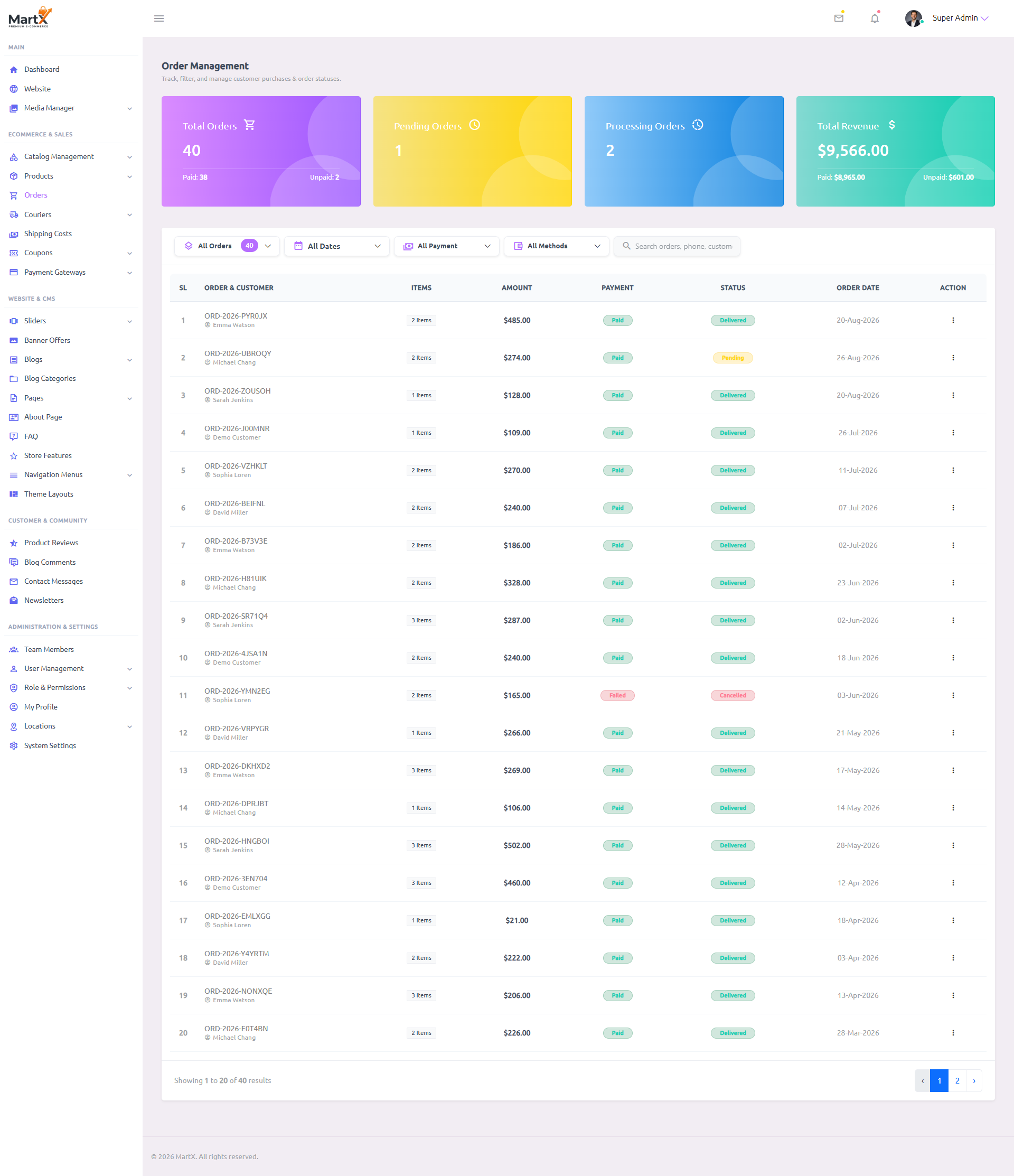
The Order Management Directory is the operational nervous system of MartX store fulfillment. It equips logistics managers with 4 high-level telemetry metric cards, multi-condition filtering (by status, date, payment state, and gateway method), real-time customer search, and a comprehensive tabular ledger of all customer purchases.
Live Storefront Orders vs. Sample Illustration
Important Note for Store Administrators: The customer names (e.g., Emma Watson, Michael Chang, Sarah Jenkins), order numbers, and financial figures shown in the preview above represent test store checkouts. On your live production server, this table populates dynamically the instant a customer completes checkout on your storefront, reflecting their real billing details, item quantities, payment verification, and chosen shipping zone.
Top Telemetry KPI Cards Breakdown
40
1
Requires immediate review2
In warehouse packaging$9,566.00
Multi-Condition Filter Bar & Live Search
| Filter Control | Options / Formats | Operational Purpose & Search Scope |
|---|---|---|
| All Orders Dropdown | All, Pending, Processing, Shipped, Delivered, Cancelled | Filters the entire orders ledger by exact fulfillment lifecycle stage. Badges display real-time order counts per status. |
| Date Range Picker | Today, Last 7 Days, Month, Custom | Restricts order query to orders created within selected start and end timestamps. |
| Payment Status Filter | Paid / Failed / Unpaid | Isolates orders based on gateway settlement state or pending cash-on-delivery collection. |
| Payment Methods Filter | Stripe, PayPal, COD, Bank Transfer | Enables financial reconciliation per individual payment processor channel. |
| Universal Search Input | Full-text live query string | Matches instantly across Order ID (e.g., #ORD-2026-PYR0JX), Customer Name, Email, and Phone Number. |
9.2 Edit Order Status, Payment Transition & Courier Tracking
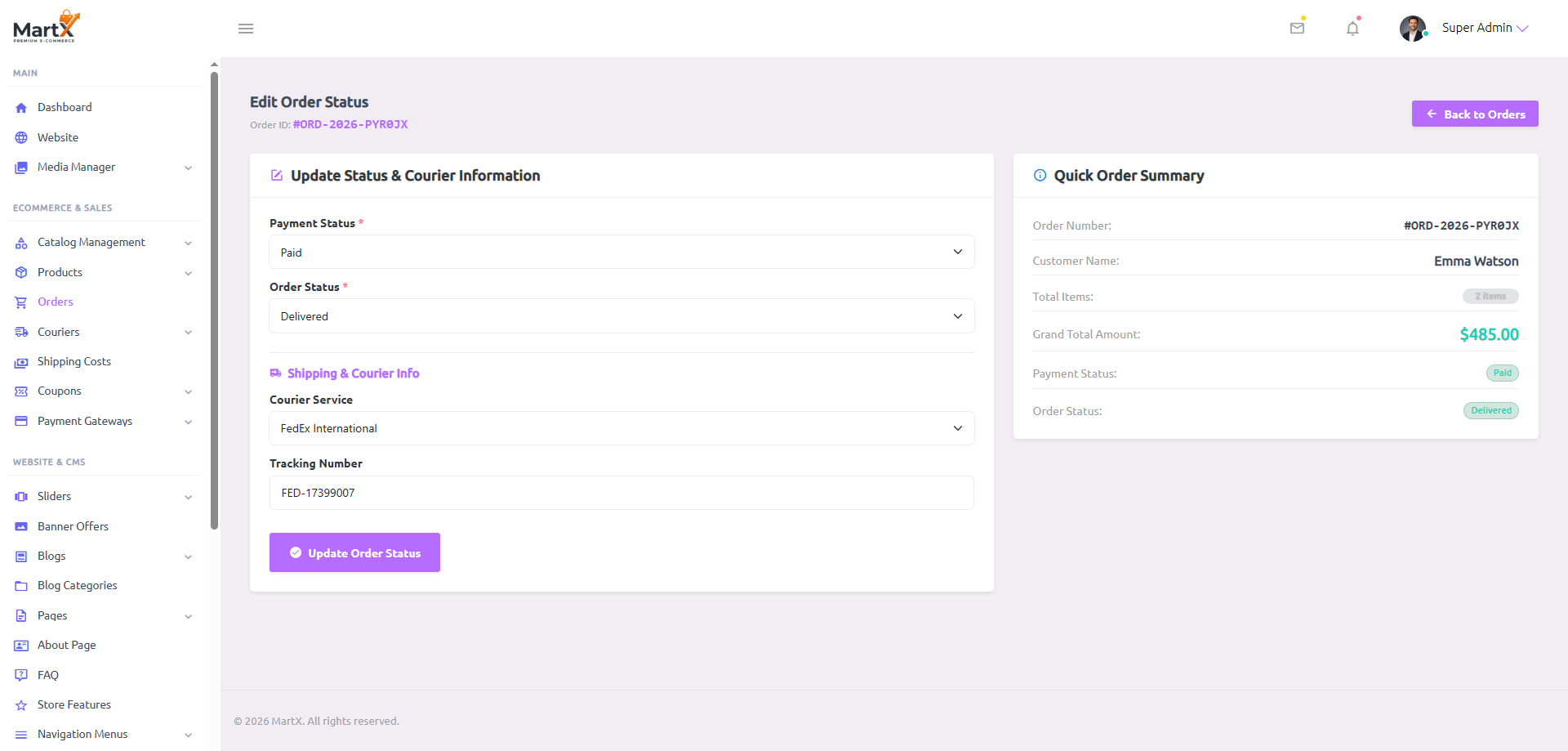
The Edit Order Status workspace provides warehouse fulfillment teams with a focused, streamlined control panel to advance order lifecycle statuses, record payment settlements, assign third-party courier dispatchers, and input tracking numbers.
Update Status & Courier Information
Update to Paid or Refunded. To enforce financial integrity, a verified Paid order cannot be downgraded to Unpaid. Once marked as Refunded, the financial record is permanently locked to maintain audit discipline.
Select active fulfillment milestone: Confirmed → Processing → Shipped → Delivered. Marking as Delivered strictly requires payment to be Paid.
Select the courier partner assigned to transport the parcel. This dropdown dynamically populates active courier services configured in Chapter 10: Couriers & Shipping Costs (e.g., Sundarban Courier, Steadfast, Pathao, SA Paribahan, RedX, FedEx, DHL, UPS).
Enter the official courier parcel booking consignment code or memo number (e.g., STE-8921004).
https://www.ups.com/track?tracknum={tracking_code} or https://steadfast.com.bd/t/{tracking_code}). When the customer clicks "Track on Courier Website", the system automatically replaces {tracking_code} with their real parcel tracking number for instant 1-click tracking.
/order-tracking), customers can search using any format (full #ORD-2026..., prefix ORD-2026..., or raw numeric digits). Customer special delivery instructions (e.g., "Call before delivery") are prominently highlighted for fulfillment staff in Admin Order View and included on printable invoices.
Quick Order Summary Sidebar
A dedicated contextual sidebar displaying key purchase metadata without leaving the editing view:
- Order Number: #ORD-2026-PYR0JX
- Customer Name: Emma Watson
- Total Items: 2 Items
- Grand Total Amount: $485.00
- Payment Status: Paid
- Order Status: Delivered
9.3 Order Details Dossier & Multi-Item Line Inspector
Clicking View Order opens the high-density Order Details Dossier. This screen displays a 3-card customer profile overview alongside an itemized visual breakdown of every product, variation, unit pricing, applied discount, delivery fee, and net total.

Shipping Address
42 Oxford Street
Payment Details
| Product Details | Unit Price | Quantity | Total Price |
|---|---|---|---|
|
Vintage Genuine Leather Biker Bomber Jacket
SKU: MTX-BOMBER-01 • Size: M
|
$190.00 | x 2 | $380.00 |
|
Layered Sterling Silver Herringbone Chain Necklace
SKU: MTX-CHAIN-SLV
|
$40.00 | x 2 | $80.00 |
| Subtotal: | $460.00 | ||
| Promotional Discount: | $0.00 | ||
| Courier Delivery Charge: | $25.00 | ||
| Grand Total: | $485.00 | ||
Customer Privacy Isolation vs. Smart Admin Context Redirect
Enterprise UX Architecture
MartX strictly separates customer self-service routes (/user/orders/{order}) from store management routes (/admin/orders/{order}/view) using Laravel Authorization Policies (OrderPolicy) to protect GDPR customer data privacy:
- Cross-Customer Isolation: Regular customer accounts cannot view each other's purchase history, shipping addresses, or phone numbers by manipulating the ID in the browser URL. Non-owner customer requests are strictly denied with an HTTP 403 Access Forbidden response.
- Smart Context-Aware Admin Redirect: When a store administrator (Super Admin or Admin) clicks or navigates to a customer order link that does not belong to their personal shopper account, MartX dynamically bypasses the customer 403 error and seamlessly redirects them directly to the operational Admin Order Details Dossier (
admin.order.view). - Personal Admin Shopper Experience: If an administrator personally checks out and purchases items on the storefront, their personal order remains viewable inside their customer portal without unnecessary redirections.
9.4 Enterprise Printable Invoice & Packaging Slip Generator
Clicking the Print Invoice button on the order details view renders a production-ready, high-resolution invoice designed for thermal warehouse printing or PDF customer dispatch. It incorporates full corporate branding, order barcodes, itemized tables, and an authentic security watermark.

Enterprise Invoice Architecture (Component Matrix):
Security "PAID" Watermark
A translucent, diagonal PAID watermark stamp renders across the invoice body for completed transactions, preventing fraudulent duplicate billing and providing clear proof of payment.
Dynamic Corporate Branding
The header displays your official MartX store logo alongside your registered corporate business address, telephone contact, and support email configured in Chapter 21 (System Settings).
Logistics & Fiscal Identifiers
Prominently displays the unique Invoice Number (ORD-2026-PYR0JX), Date (20-Aug-2026), and sequential internal Order ID (#40).
Electronic Signature Disclaimer
Includes international eCommerce legal compliance text: "This is a computer-generated document and does not require a physical signature."
Protective Invoice Access Logic (COD vs Online Checkouts)
To ensure seamless warehouse logistics while eliminating fiscal fraud, MartX enforces a smart invoice access policy tailored to the payment channel:
Cash on Delivery & Bank Transfer (Open Access)
Cash on Delivery orders naturally remain unpaid until delivery. To prevent shipping delays, invoice printing and download are immediately active upon placement so your warehouse packing team can print physical delivery slips instantly.
Active Online Gateways (Temporary Session Hold)
While a customer is actively completing an online payment session (status: Processing), invoice download is temporarily held. Once the gateway webhook confirms payment (or the timer cancels the abandoned cart), the invoice unlocks instantly with an authentic PAID watermark.
Visual Flowchart: Order Lifecycle & Invoice Protocol
New Order Created
Buyer completes checkout form
Payment Channel Check
COD vs Active Online Gateway
Dispatch & Complete
Invoice stamped with PAID watermark
9.5 Standard Operating Procedure: 5-Step Fulfillment Protocol
Follow this standardized workflow to process, fulfill, and dispatch orders with maximum operational accuracy:
Identify & Filter Incoming Orders
Navigate to Ecommerce & Sales > Orders. Click the Pending Orders KPI card or filter by status=pending to isolate new purchases requiring processing.
Verify Payment & Stock Availability
Click View Order. Inspect the itemized table to verify product variations, sizes, and colors. For COD orders, verify telephone contact with the buyer before dispatch.
Print Warehouse Packaging Slip
Click Print Invoice. Print a thermal packing slip or save as PDF to accompany the parcel in the fulfillment box.
Assign Courier & Tracking Code
Navigate to Edit Order Status. Select your configured courier partner (e.g., Sundarban Courier, Steadfast, Pathao, FedEx), enter the parcel consignment tracking number, update order status to Shipped, and click Update Order Status. The customer receives the tracking code with a direct tracking portal link.
Final Delivery Reconciliation
Upon courier delivery confirmation, update the order status to Delivered and reconcile the payment status to Paid. Telemetry metrics update instantaneously.