
Chapter 10: Couriers & Shipping Cost Management
Universal courier fleet orchestration, official online tracking portals, zone-based delivery pricing rules, and state-level automated checkout calculations.
Universal Tracking Support
Connect any domestic or international courier service (Sundarban, Steadfast, Pathao, FedEx, UPS) without complex API keys.
Zone Pricing Matrix
Configure granular delivery fees grouped by country, division, and state for automatic checkout rate calculations.
One-Click Buyer Tracking
Customers receive tracking codes and direct portal buttons to query live transit status directly on the courier's website.
Before launching your store or accepting live customer orders, administrators must establish active shipping cost rules under Shipping Costs. The MartX storefront checkout engine dynamically reads these geographic zone rules to calculate customer delivery charges. Without configured shipping zones, orders cannot automatically compute accurate delivery tariffs at checkout.
Module Architecture & Administrative Workflow
Shipping and parcel fulfillment in MartX is architected across two synergistic submodules accessible directly under the Ecommerce & Sales sidebar group:
1. Couriers Management
Manages your logistics delivery fleet. Stores carrier names and their public tracking search portal URLs so staff can assign consignment numbers during order fulfillment.
2. Shipping Costs & Zones
Defines delivery fee rules based on geographic boundaries (e.g., Inside Dhaka, Outside Dhaka, Sub-Urban). Automatically updates order totals during storefront checkout.
Visual Flowchart: Zone Shipping Calculation & Courier Assignment
How MartX calculates dynamic delivery tariffs and routes parcels through registered courier carriers:
Zone Setup
Define geographic rules & fixed/conditional fees
Checkout Engine
Customer enters address; zone fee dynamically applied
Order Settlement
Order locked with exact shipping fee & invoice total
Carrier Dispatch
Admin assigns courier & inputs Consignment ID
Live Tracking
Customer tracks parcel via carrier tracking URL
10.1 Couriers Directory & Fleet Management
The Couriers Management Directory provides a centralized catalog of all delivery carriers authorized to transport store shipments. Logistics supervisors can instantly monitor carrier status, query tracking URLs, perform real-time searches, and manage carrier records.

Couriers Directory Interface Elements
| UI Control / Column | Type & Visual Representation | Operational Description & Behavioral Logic |
|---|---|---|
| Add New Courier Button | + Add New Courier | Top primary action trigger in the page header that navigates directly to the courier creation view (/admin/couriers/create). |
| Courier Status Filter | All Couriers (3) ▾ | Contextual filter dropdown displaying total configured carriers with quick segmentation between Active and Inactive partners. |
| Search Input Field | Search couriers... |
Instant search input that filters table rows dynamically against carrier names and tracking URL domains. |
| Courier Name Column | UPS Global Logistics | The official registered brand name of the courier service. This exact name appears in customer tracking dossiers and dispatch selectors. |
| Tracking Page URL Column | https://www.ups.com/track ↗ | Hyperlinked URL opening the carrier's public parcel tracking search portal in a new browser tab for quick administrative inspection. |
| Status Column | Active | Visual state pill. When set to Active, the courier appears in the order fulfillment status editor. When Inactive, it is hidden from selectors without affecting past orders. |
| Action Menu | ⋮ | Contextual menu with granular controls to Edit partner parameters or securely Delete the courier record. |
10.2 Add New Courier Partner & Operational Tracking Architecture
Adding a courier partner in MartX requires zero technical API integrations or webhook setups. The interface is engineered with a modern two-column layout featuring an active input form on the left and an integrated Operational Guide on the right that explains how parcel tracking functions from warehouse dispatch to customer delivery.
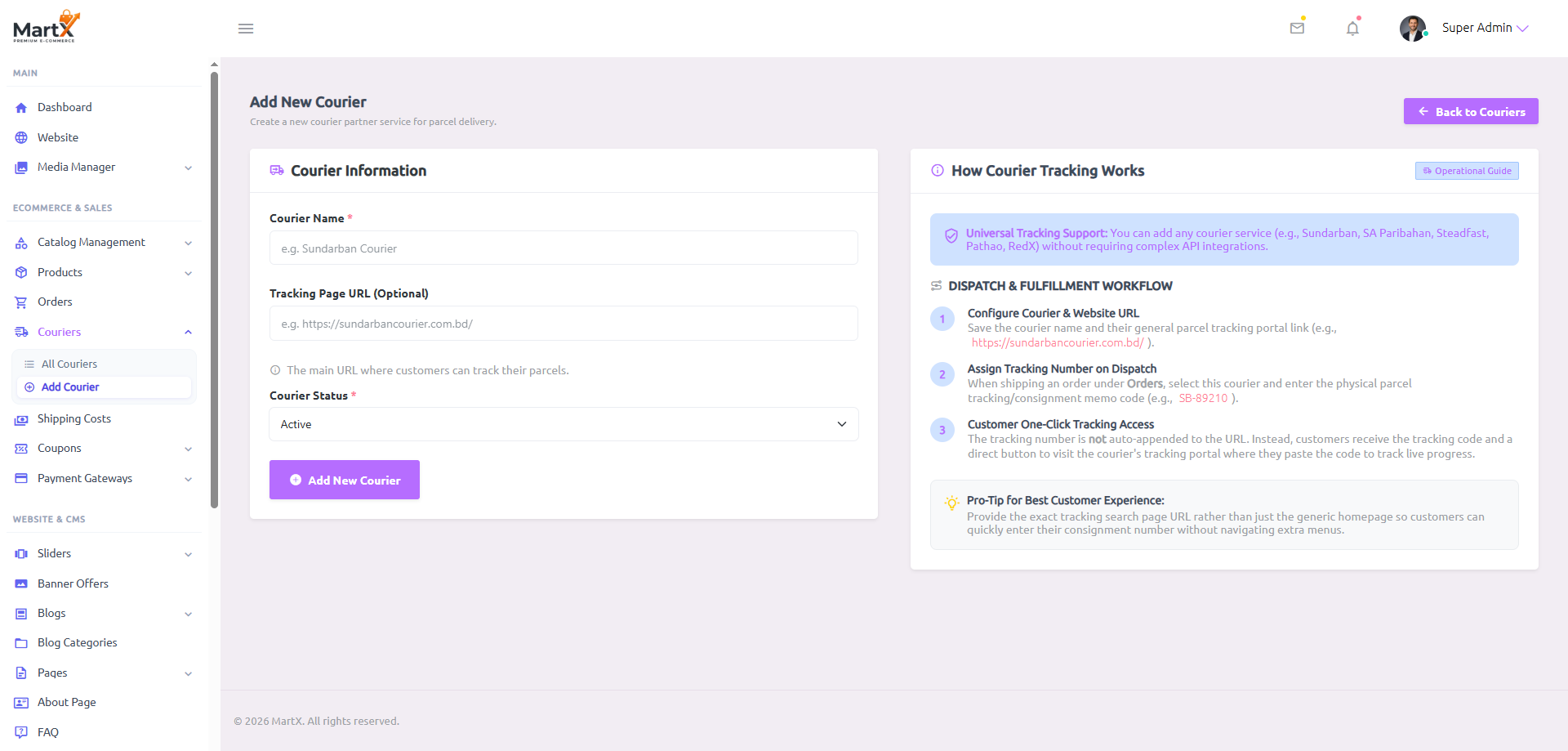
Courier Information Form Fields
The official name of the carrier (e.g., Sundarban Courier, Steadfast, Pathao, FedEx). This name is visible to administrative fulfillment teams in order dispatch selectors and displayed on customer order confirmation slips.
The official website URL where customers can query parcel transit progress (e.g., https://sundarbancourier.com.bd/ or https://www.fedex.com/fedextrack). Providing this link activates the customer one-click tracking engine.
Select Active to make this carrier available for ongoing fulfillment, or Inactive to archive the service without removing historical order tracking associations.
3-Step Tracking Architecture
How It WorksSB-89210).
https://steadfast.com.bd/t/ or https://sundarbancourier.com.bd/tracking) rather than just the generic brand homepage. This allows buyers to paste their consignment number immediately without having to locate the tracking subpage manually.
10.3 Edit & Synchronize Courier Parameters
When carrier contact endpoints, portal addresses, or operational statuses change, administrators can update parameters seamlessly via the Edit Courier console. Changes are instantly synchronized across all ongoing fulfillment pipelines.

Update Synchronization & Historical Integrity
Modifying a courier's Tracking Page URL or Name takes effect immediately for all active dispatches and upcoming shipments. Past fulfilled orders maintain their historical consignment numbers and link to the updated portal destination seamlessly.
- Carrier Name Changes: Reflected dynamically across all admin dropdowns and buyer invoices.
- URL Endpoint Adjustments: Updates the destination target for buyer "Track on Courier Website" triggers instantly.
- Deactivating a Carrier: Sets status to Inactive, which cleanly removes the partner from order dispatch dropdowns while preserving tracking records on delivered packages.
10.4 Shipping Costs Directory & Operational Zone Matrix
The Shipping Costs Management Directory (/admin/shipping-costs) is where store owners configure geographic delivery tariffs. Every store must establish delivery fee rules before trading to ensure the storefront checkout engine calculates correct shipping costs based on the customer's delivery destination.

Shipping Costs Directory Interface Elements
| UI Control / Column | Type & Visual Representation | Operational Description & Behavioral Logic |
|---|---|---|
| Add New Shipping Cost | + Add New Shipping Cost | Header action trigger leading to the zone pricing creation console (/admin/shipping-costs/create). |
| Name (Zone) Column | Express Priority Courier (DHL/FedEx) | Descriptive name identifying the delivery zone (e.g., Inside City, Outside City, Express Priority, Standard Worldwide). |
| Price (Base & Incremental) Column |
$25.00 / ৳60.00 (Base)
+ $5.00 / extra item
|
Displays the initial base delivery rate billed for the 1st item, alongside any incremental surcharge per additional item for multi-quantity cross-border orders. |
| Assigned States Column | Ontario British Columbia Quebec | Interactive pill badges displaying every state, district, or province covered under this exact shipping cost rule. |
| Action Menu | ⋮ | Granular controls enabling administrators to Edit zone details or permanently Delete the shipping rate rule. |
Shipping Zone Coverage & Operational Guidelines (Under-Table Intelligence)
Located directly beneath the shipping rules table, this persistent operational card reinforces critical system constraints for store managers:
10.5 Add & Edit Geographic Zone Pricing Rules
Configuring new delivery zones or modifying existing shipping rates is performed through the dedicated Zone Details console. The interface integrates an interactive multi-country state accordion with instant validation feedback.


Zone Details Parameters
Descriptive operational name for the zone (e.g., Inside Dhaka Metro, Express Priority Courier (DHL/FedEx)).
The initial delivery tariff charged for the first item in the cart (e.g., $25.00, ৳60.00). Set to 0 for zones offering unconditional free delivery.
Incremental surcharge applied to each extra item beyond the first (Qty > 1). For example, if Base is $20.00 and Additional Fee is $5.00, ordering 3 items calculates: $20 + (2 × $5) = $30.00. Leave as 0 for standard flat-rate delivery zones.
Hierarchical selection grouped by country (e.g., Canada, Germany, United States, United Kingdom, Australia). Features a master "Select All States" checkbox alongside individual state toggles.
Automated Checkout Calculation Engine
Real-Time
When buyers proceed to the storefront checkout (/checkout), MartX calculates shipping automatically based on their destination address and total cart quantity:
Anti-Tampering Server Security: The calculation is executed dynamically in the buyer's browser via AJAX and re-computed authoritatively on the backend by OrderRepository. Inspect-element alterations are strictly ignored.
Form Validation State Persistence: If a customer submits the checkout form with a validation error (e.g. missing required field), the interface automatically restores previously selected billing and shipping states, eliminating redundant re-entry.
"Validation Error: Please select at least one state or district for this shipping zone." The interface will smoothly scroll to the selector, preventing accidental creation of orphaned or unreachable delivery zones.
10.6 Standard Operating Procedure (SOP): End-to-End Shipping & Logistics Protocol
To ensure error-free parcel handling, tracking transparency, and accurate financial accounting, follow this standardized 5-step operational protocol:
Mandatory Setup: Establish Geographic Shipping Zones
Navigate to Shipping Costs > Add New Shipping Cost. Create your operational delivery zones (e.g., Inside City, Outside City, Express) and map all covered states or districts with their respective delivery fees.
Register Official Courier Fleet Partners
Navigate to Couriers > Add Courier. Input the carrier name (e.g., Sundarban, Steadfast, Pathao, FedEx) and their public parcel tracking search portal URL.
Customer Order Placement & Dynamic Fee Application
The buyer selects their delivery district during checkout. MartX matches the state against configured shipping zones and dynamically attaches the exact delivery charge (Base Fee + Quantity Multiplier) to the order invoice. If any validation error occurs, state selections are preserved seamlessly without requiring re-entry.
Warehouse Dispatch & Consignment Tracking Assignment
Once the parcel is packed and handed over to the courier, the warehouse admin opens Edit Order Status, selects the courier partner, inputs the booking consignment code, and marks status as Shipped.
Buyer Self-Service Tracking & Delivery Reconciliation
The buyer accesses their order tracking page, copies their consignment code, and clicks "Track on Courier Website" to monitor live transit progress until final delivery confirmation.