
Chapter 12: Payment Gateways & Visual Logos Hub
Production payment configurations (Stripe, PayPal, SSLCommerz, CoinGate, Cash on Delivery, Manual Transfer) and high-res checkout logos.
Production Ready
Engineered for mission-critical enterprise commerce with zero latency overhead.
Granular Controls
Fully customizable via the modern MartX Admin Dashboard with real-time feedback.
Instant Sync
Automated state propagation across multi-device clients, cache, and database layers.
Module Architecture & Workflow
This chapter details the comprehensive configuration, operational controls, and best practices for Chapter 12: Payment Gateways & Visual Logos Hub. Follow the guided procedures below to maintain peak operational performance and security.
12.1 Gateway Selection Console & Architectural Overview
MartX provides a unified, enterprise-grade payment processing architecture supporting 6 core payment methods across credit/debit cards, digital wallets, domestic Bangladesh banking, borderless cryptocurrency rails, and localized offline payments. Administrators manage all payment channels through the centralized Gateway Settings console (Ecommerce & Sales > Payment Gateways > Gateway Settings).
Global Cards
Stripe (Cards, Apple Pay, Google Pay)
Global Wallet
PayPal (Express Checkout & Wallet)
Local Gateway
SSLCommerz (bKash, Nagad, BD Cards)
Crypto Rails
CoinGate (BTC, ETH, 70+ Coins)
Doorstep COD
Cash on Delivery (Advance / Full)
Manual Direct
Manual Payment (Bank Wire & TrxID)
Visual Flowchart: Customer Checkout & Payment Routing Engine
When a customer reaches the MartX checkout page, the routing engine processes transactions across three primary channels:
Online Gateways
Stripe • PayPal • SSLCommerz • CoinGate
Cash on Delivery
Doorstep Payment Collection
Manual Transfer
Direct Bank Wire • Personal Mobile Money
When your storefront operates in a regional base currency (such as BDT or EUR) while utilizing international gateways that settle in USD (such as PayPal or CoinGate), the administrative console provides a dedicated Exchange Rate Field. The checkout engine converts order subtotals by this multiplier in real time, ensuring accurate international billing without discrepancy.
Multi-Currency Exchange Rate Reference Matrix
Market-Driven • Dynamic Floating RatesForeign exchange currency rates fluctuate based on international forex markets and central bank regulations. The numerical conversion rates shown below are illustrative examples (নমুনা উদাহরণ) to explain calculation logic. Store administrators must input their current, actual live exchange rates corresponding to active bank or settlement terms.
| Store Base Currency | Gateway Configured | Admin Input Field | Sample Value | Checkout Result |
|---|---|---|---|---|
| BDT (৳) - Bangladeshi Taka | PayPal Express | 1 USD = ? Base Currency |
122.50 |
A ৳1,225 cart charges $10.00 USD at checkout \((1225 \div 122.50)\). |
| BDT (৳) - Bangladeshi Taka | CoinGate (Crypto) | 1 USD = ? Base Currency |
122.50 |
Locks a $10.00 USD equivalent in BTC/ETH for 20 minutes. |
| EUR (€) - Euro | PayPal / CoinGate | 1 USD = ? Base Currency |
0.92 |
A €92 cart charges $100.00 USD on PayPal. |
| USD ($) - US Dollar | PayPal / Stripe / CoinGate | 1 USD = ? Base Currency |
1.00 |
A $50.00 cart charges exactly $50.00 USD (1:1 parity). |
12.2 Global Card & Mobile Wallet Processing: Stripe
Stripe is the premier international card processing infrastructure for MartX. It accepts all major credit and debit cards (Visa, MasterCard, American Express, Discover, JCB) alongside 1-click mobile wallets including Apple Pay and Google Pay via Stripe Elements.

Stripe Parameter Specification
| Field Name | Sample Value | Merchant Operational Purpose |
|---|---|---|
| Status Toggle | Active / Inactive | Enables or disables Stripe across customer checkout without erasing stored API credentials. |
| Stripe Key * | pk_test_... / pk_live_... |
Your Stripe Publishable API key. Used on customer checkout for direct client-side tokenization (PCI-DSS compliant). |
| Stripe Secret * | sk_test_... / sk_live_... |
Your confidential Stripe Secret API key. Securely stored and used server-side to authorize payment charges. |
| Webhook Secret (Optional) | whsec_... |
Allows Stripe servers to send asynchronous background notifications when payments succeed or fail. |
12.3 Global Digital Wallet & Express Checkout: PayPal
PayPal offers worldwide brand recognition, enabling buyers to pay with their stored PayPal wallet balances, linked bank accounts, or debit/credit cards without entering card details on your website.

PayPal Parameter Specification
| Field Name | Configuration Type | Merchant Operational Purpose |
|---|---|---|
| Exchange Rate * | 1 USD = ? Base Currency |
Multiplies checkout subtotals into equivalent USD for PayPal settlement. If your store currency is USD, set to 1.00. Never enter 0. |
| Environment Mode | Sandbox / Live | Switch between Sandbox test mode and Live production payments with a single click. |
| Sandbox Credentials | Client ID & Secret | Test credentials obtained from PayPal Developer Portal (Apps & Credentials > Sandbox). |
| Live Credentials | Client ID & Secret | Production credentials from your verified business PayPal account for processing real customer payments. |
12.4 Bangladesh Domestic Payment Gateway: SSLCommerz
SSLCommerz is Bangladesh's premier licensed payment aggregator. It enables eCommerce stores to accept payments from bKash, Nagad, Rocket, Upay, domestic and international Visa/MasterCard, and internet banking portals across all major Bangladeshi commercial banks.

SSLCommerz Parameter Specification
| Field Name | Input Format | Merchant Operational Purpose |
|---|---|---|
| Environment Mode | Sandbox / Live | Toggle between the SSLCommerz testing sandbox and active production gateway. |
| Store ID * | Text string | Unique merchant store identifier issued during SSLCommerz merchant onboarding. |
| Store Password * | Password / Key | Secure authentication secret provided by SSLCommerz for encrypted server-to-server API validation. |
12.5 Borderless Web3 & Cryptocurrency Processing: CoinGate
For global decentralized commerce, MartX integrates CoinGate, enabling customers to pay using Bitcoin (BTC), Ethereum (ETH), Tether (USDT), Litecoin (LTC), and 70+ leading cryptocurrencies with automated invoice rate locking.

CoinGate Parameter Specification
| Field Name | Configuration Type | Merchant Operational Purpose |
|---|---|---|
| Exchange Rate * | 1 USD = ? Base Currency |
Converts store order totals into USD before creating the CoinGate cryptocurrency payment invoice. |
| Environment Mode | Sandbox / Live | Toggle between the CoinGate Sandbox (testnet cryptocurrency) and Live production blockchain network. |
| Auth Token * | API Secret Token | CoinGate API authentication token generated from your CoinGate merchant portal under API > Apps. |
12.6 Cash on Delivery (COD) & Advance Shipping Charge Enforcement
Cash on Delivery is a vital payment method in emerging markets but carries high return and refusal risks (RTO). MartX features a sophisticated Advance Delivery Charge Architecture that eliminates fake orders by requiring buyers to pay the courier shipping fee online before confirming their COD shipment.

Mandatory Selection Validation Architecture
1. Client-Side Instant Prevention
When "Require Advance Shipping Charge?" is toggled ON, the system inspects the Allowed Advance Payment Methods checkboxes. If an administrator clicks "Save And Update" without selecting at least one active gateway, submission is halted instantly (e.preventDefault()), the screen scrolls smoothly to the container, and an inline red warning is revealed: "Selection Required: Please select at least one active payment gateway to collect advance shipping charges."
2. Server-Side Backend Safeguard
The backend controller (PaymentMethodController::updateGateways) strictly validates that when payment_cod_advance_shipping == '1', the payment_cod_advance_methods payload must not be empty. Any malformed request is rejected with a session flash error, completely preventing database corruption or headless checkout deadlocks.
12.7 Manual Bank & Direct Mobile Transfers (Manual Payment)
For stores accepting direct bank wire transfers, offline deposits, or personal mobile wallet "Send Money" transactions (bKash/Nagad personal numbers), the Manual Payment module allows administrators to specify custom buyer instructions.

Manual Payment Customer Instruction Best Practices
In the Payment Instructions for Customers textarea, clearly state:
- Your exact Bank Account Number, Routing Number, and Account Name.
- Personal bKash / Nagad / Rocket numbers if using direct mobile transfers.
- Instruction for the buyer to submit their bank deposit slip or Mobile Transaction ID (TrxID) into the checkout notes.
12.7.1 Direct Bank Transfer & Extended Gateways Pipeline (Paystack, Razorpay, BinancePay, WayForPay)
In addition to standard manual mobile payments, MartX incorporates a dedicated Direct Bank Transfer enum case (PaymentMethodEnums::BANK_TRANSFER) for high-value B2B invoicing, wholesale checkouts, and international SWIFT/IBAN wire remittances. Furthermore, the core framework comes with pre-configured, CSRF-exempted webhook callback endpoints for regional international expansion:
Paystack (Africa)
Nigeria, Ghana, Kenya & South Africa card and mobile money processing.
/payment/paystack/callback
Razorpay (India)
UPI, NetBanking, RuPay, and domestic Indian digital wallets.
/payment/razorpay/callback
BinancePay (Crypto)
Instant Web3 crypto payment via QR code and Binance App wallet.
/payment/binancepay/callback
WayForPay (E. Europe)
Fast checkout for Ukraine, Poland, and international multi-currency cards.
/payment/wayforpay/callback
bootstrap/app.php, all callback endpoints (/payment/stripe/webhook, /payment/ssl/*, /payment/coingate/callback, /payment/paystack/callback, /payment/razorpay/callback, /payment/binancepay/callback, /payment/wayforpay/callback) are pre-whitelisted in validateCsrfTokens(), eliminating 419 Page Expired errors when remote payment servers send background IPN status notifications.
12.8 Payment Logos & Visual Trust Badges Hub (Storefront Footer & Checkout)
Beyond backend transaction processing, displaying recognized payment brand logos (MasterCard, Visa, bKash, PayPal, Amex) on the storefront Footer and checkout summary is proven to enhance buyer confidence and checkout conversion rates. The Payment Logos Console (Ecommerce & Sales > Payment Gateways > Payment Logos) manages these visual assets.

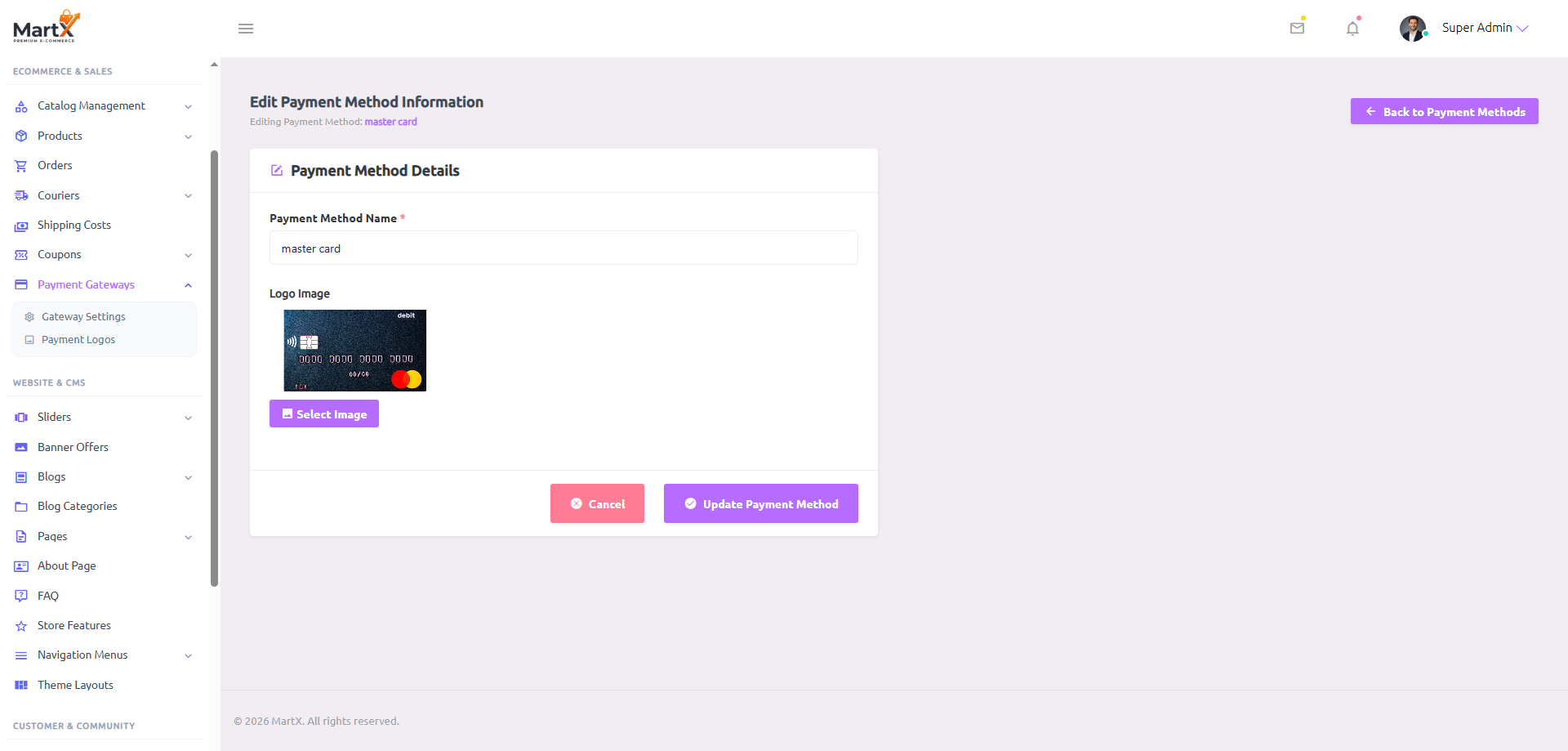
Payment Logos Management Interface Elements
| Control / Column | UI Interaction | Storefront Operational Impact |
|---|---|---|
| Drag Handle (SL) | ::: 1, ::: 2 | Drag-and-drop table row reordering via HTML5 draggable JS. Controls the exact horizontal sequence of payment logos displayed across the storefront website footer. |
| LOGO Preview | Thumbnail Image Tag | Displays a crisp thumbnail of the brand asset (PNG, SVG, WEBP) currently published in the database. |
| Payment Method Name * | Text Input (Required) | Brand title (e.g., master card, visa card, bKash). Used as the image alt tag for accessibility and SEO compliance. |
| Logo Image * (Media Manager) | Select Image | Launches the central MartX Media Manager modal. Allows instant asset selection from uploaded media or direct disk upload. |
| Action Dropdown | Contextual Menu | Provides immediate administrative access to Edit the record or Delete the brand asset from the storefront footer. |
12.9 Payment Settlement, Webhooks & Security SOP
Adhere to enterprise financial engineering best practices when deploying live payment channels on MartX:
Security & Key Management
- Encrypted Credential Storage: All Secret Keys, Auth Tokens, and Passwords are automatically AES-256 encrypted in the database before storage.
- Sandbox Verification: Always run complete checkout transactions using Sandbox test cards before flipping environment toggles to Live Mode.
- Webhook URL Whitelisting: Configure your gateway portal webhooks to point to your store's secure SSL endpoint to guarantee instant payment state callbacks.
Financial Accounting & Conversion
- Never Enter 0 for Exchange Rates: Setting an exchange rate to
0causes payment calculation failure. If your store currency matches the gateway, set it to1.00. - Mitigate COD Abandonment: Keep Require Advance Shipping Charge? active to ensure customer commitment and protect logistics capital.
- Footer Trust Badges: Keep 4–6 high-resolution payment logos in the visual logos hub to optimize buyer checkout conversion.
12.10 Payment Logs & Forensic Financial Audit Hub
MartX includes a centralized Payment & Financial Audit Hub designed specifically for store owners, accountants, and financial auditors. While the standard Order Management screen tracks packages, shipping labels, and fulfillment statuses, this hub acts as an immutable legal ledger of raw gateway callbacks, settlement figures, and bank communication records.
Executive Financial Telemetry Cards
Four executive cards provide an instant snapshot of your store's digital cashflow and checkout conversion efficiency:
Total confirmed digital revenue successfully captured and credited across all gateways for the selected period.
Percentage of initiated payment attempts that resulted in successful settlements vs customer drop-offs.
Orders where customers abandoned checkout midway, automatically cancelled and inventory restocked by background cron rules.
Transactions rejected by issuing banks (e.g., insufficient balance, expired cards, or incorrect CVV) requiring forensic review.
Multi-Criteria Filtering with Instant AJAX Live Sync
The audit toolbar provides instant, zero-reload filtering. Whenever you select an option, the page seamlessly updates both the data table and the top 4 metric cards simultaneously:
- All Gateways Filter: Isolate transactions by provider:
Stripe,PayPal,SSLCommerz, orCoinGate. - All Statuses Filter: Filter by outcome:
SUCCESS,FAILED, orPENDING. - Date Range Filter: Fast presets for
Today,Yesterday,This Week,Last 7 Days,This Month,Last Month,This Year, or a custom calendar date picker. - Live Debounced Search: Find transactions by Order Number (e.g.,
#ORD-202610...), Customer Name, Email, or Gateway. - Floating Reset Button: A subtle floating pill bar appears when filters are active, allowing one-click restoration to all-time view.
Forensic Payload Inspector: Resolving Customer Disputes & Chargebacks
When a customer claims funds were deducted or when an issuing bank requests verification for a disputed charge, clicking the Inspect button on any row opens the dark-themed Forensic Payload Modal:
Gateway Response / Webhook Tab
Displays the authentic, raw response sent back by Stripe, PayPal, or SSLCommerz. Includes the official Gateway Transaction ID, customer card brand (Visa, Mastercard), last 4 digits, and exact bank failure codes (e.g., insufficient_funds, do_not_honor).
One-Click Clipboard Copy
Store managers can click the Copy button to instantly copy the complete technical payload to the clipboard, providing definitive proof to submit directly to payment gateway support or banking dispute portals.